Creating a stylish logo reveal video does not always require advanced video-editing software or years of animation experience. With AI tools such as Google Gemini, you can create a dramatic 3D red cloth-style Youth logo reveal that looks modern, energetic, and professional. This type of animation works especially well for youth organisations, college groups, sports communities, social media pages, events, and promotional videos.
The main idea is to make the Youth logo appear as if it is hidden behind or formed from flowing red fabric. The cloth moves naturally through the scene, creating suspense before revealing the logo. A combination of realistic fabric, cinematic lighting, 3D depth, shadows, and smooth camera movement can make the final result look much more impressive than a simple logo animation.
Before starting, you should have a clear version of your Youth logo. A high-quality PNG logo with a transparent background is ideal because it gives the AI a clean reference. If you only have a screenshot or a low-resolution image, try to use the clearest version available. The logo should remain recognisable throughout the animation, especially if it contains specific text, symbols, or colours.
Open Google Gemini and look for the image or video generation features available in your account. Depending on the version and region, the exact tools and options may be different. If video generation is available, you can provide your logo as a reference image and describe the animation you want. The more clearly you describe the scene, movement, lighting, and camera direction, the easier it is for the AI to understand your idea.
Instead of simply asking Gemini to “make a Youth logo reveal,” describe the visual concept in detail. For example, explain that you want a cinematic 3D scene with a rich red cloth moving through the air. The fabric should look realistic, with visible folds, soft shadows, and natural motion. The logo should initially be hidden behind the cloth and gradually become visible as the fabric moves away. You can also mention that the final frame should focus clearly on the Youth logo.
The red cloth is one of the most important elements of this effect. A bright but deep red colour can give the animation a powerful and energetic appearance. Ask for realistic cloth physics rather than a flat red shape. The fabric should have natural wrinkles and folds and should respond to movement as if it were real material. A slight glossy texture can also make the cloth catch the light beautifully without making it look artificial.
Lighting can completely change the quality of the reveal. For a professional result, describe cinematic studio lighting with a strong key light, subtle rim lighting, and soft shadows. A darker background can make the red cloth and logo stand out. You can also request a slight glow around the logo at the moment of revelation. However, avoid adding too many effects because excessive glow, particles, or lens flares can make the video look less professional.
Camera movement is another detail that should not be ignored. A slow camera push-in can make the reveal feel dramatic. You could begin with a close view of the moving fabric and then gradually pull the camera toward the logo as it appears. Another option is to start with a wider shot and slowly move closer while the cloth sweeps across the screen. The important thing is to keep the camera movement smooth rather than sudden.
Timing also matters. A short logo reveal is usually more effective than a long animation. Around five to eight seconds can be enough for a social media intro or event video. The first few seconds can build anticipation with the moving cloth, followed by the actual logo reveal and a final moment where the logo stays visible. Holding the final logo for a second or two gives viewers enough time to recognise it.
When writing your prompt, mention that the original Youth logo should not be redesigned. This is especially important if you are using an existing logo. AI-generated visuals can sometimes change letters, shapes, colours, or symbols. Clearly tell Gemini to preserve the exact logo design, proportions, colours, spelling, and recognisable details. You can also state that the logo should remain sharp and readable during the final reveal.
A useful prompt can be written in natural language rather than complicated technical terms. For example, you could describe a cinematic 3D logo reveal where a realistic red silk cloth flows dramatically across a dark studio background. As the fabric moves and folds naturally, it slowly uncovers the original Youth logo positioned in the centre. The camera moves forward smoothly, dramatic lighting highlights the folds of the fabric, and the final shot shows the complete logo clearly with realistic depth, shadows, and a polished professional appearance.
Once Gemini generates the result, carefully check the logo. AI video generation can occasionally introduce small changes to text or graphic elements. If the logo is distorted, ask Gemini to regenerate the scene while emphasising that the supplied logo must be preserved exactly. You can also simplify the scene if the AI is struggling. For example, reduce the number of particles, complicated backgrounds, or multiple objects and focus mainly on the red cloth and logo.
If you want a more premium look, you can add subtle environmental details. A dark red or black background, soft atmospheric haze, tiny floating particles, and realistic reflections can create a cinematic feeling. Keep these elements subtle. The logo should remain the main subject of the video rather than becoming lost among visual effects.
Sound can be added afterwards if the generated video does not include suitable audio. A deep whoosh as the cloth moves, followed by a short impact or cinematic sound when the logo appears, can make the reveal feel much more powerful. Music with an energetic build-up can also work well for Youth-related content. When editing the audio, try to synchronise the strongest sound with the exact moment the logo becomes fully visible.
You can also create different versions of the same concept for different platforms. A landscape version works well for YouTube presentations, event screens, and promotional videos, while a vertical version is better suited to Instagram Reels, YouTube Shorts, and other mobile-focused platforms. A square version can be useful for social media posts. If possible, decide the final aspect ratio before generating the video so that the composition is designed correctly from the beginning.
One useful approach is to generate the visual in stages. First, create a strong still image showing the red cloth, lighting, background, and logo composition. Once you are satisfied with the appearance, use that image as the visual reference for the video generation. This can help maintain consistency between the opening scene and the final logo position.
The biggest advantage of using Gemini for this type of project is that you can experiment quickly. You do not need to get the perfect result on your first attempt. Try different descriptions for the cloth movement, camera angle, lighting, and background. For example, one version might use a dramatic side sweep, while another might have the cloth spiral around the logo. Comparing several variations can help you discover which style best matches your Youth brand.
Keep your instructions simple and focused when a generation repeatedly fails. Instead of adding more and more details, identify the most important elements: realistic red cloth, exact Youth logo, cinematic lighting, smooth camera movement, and a clean final reveal. Once those elements work correctly, you can gradually add secondary effects.
A successful 3D red cloth Youth logo reveal is ultimately about creating anticipation and then delivering a clean, memorable logo presentation. Google Gemini can make the process much easier by turning a detailed visual description and logo reference into an impressive starting point. With the right prompt, careful checking, and a little experimentation, you can create an intro that feels energetic, modern, and suitable for professional Youth branding.
The key is not simply to ask AI to make a logo video. Think like a director: decide how the scene begins, how the red cloth moves, when the logo appears, how the camera travels, what the lighting should feel like, and how the final frame should look. Once those creative decisions are clear, Gemini becomes a useful tool for bringing the concept to life.
BGM Download
SCENE 1 PROMPT
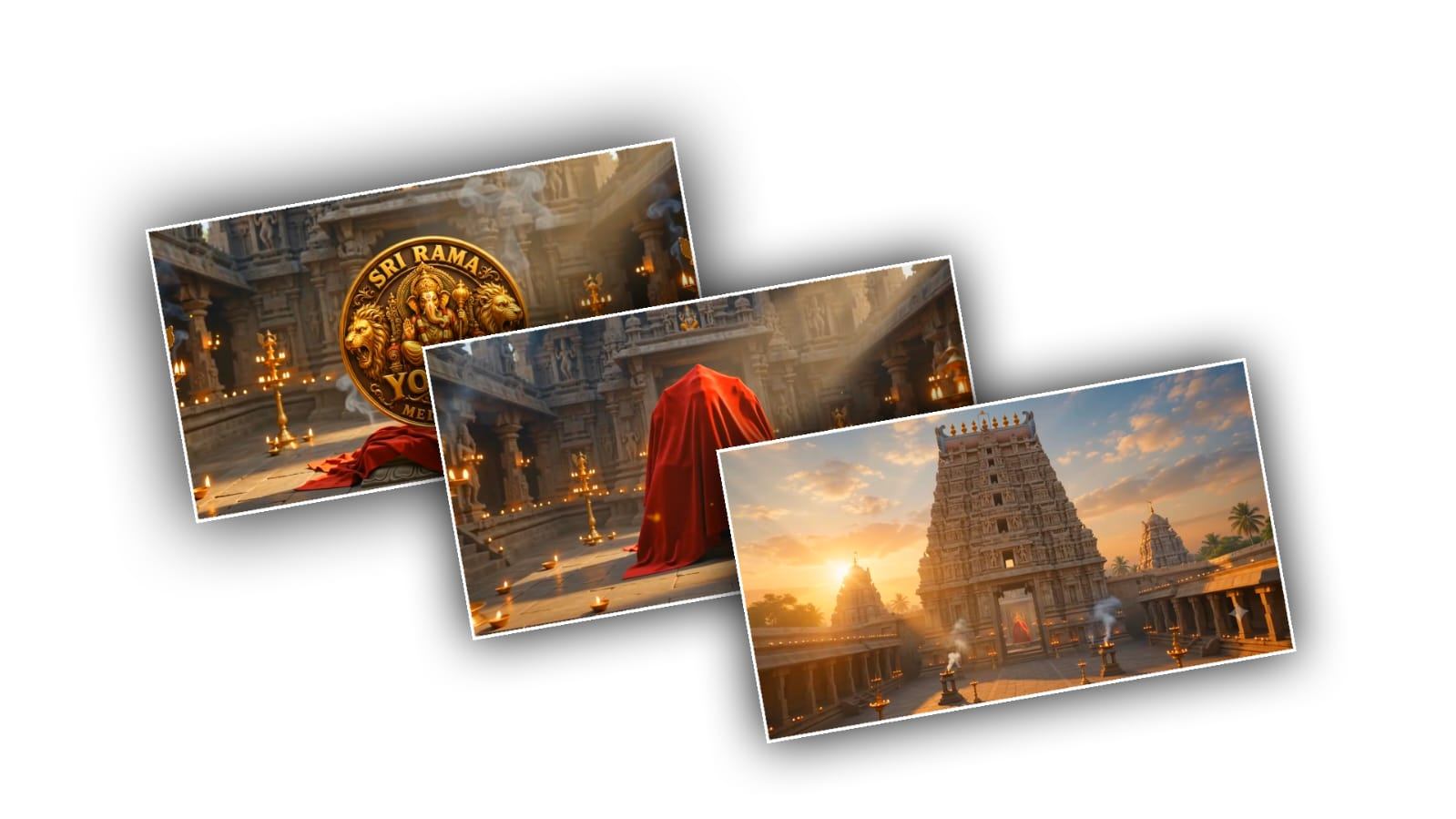
Create a cinematic 10-second video set inside a magnificent grand South Indian temple dedicated to Lord Ganesha. Begin with an extremely wide establishing shot from far outside the temple. Show a massive, majestic Dravidian-style South Indian temple with a towering detailed gopuram, traditional stone architecture, rows of glowing oil lamps, subtle incense smoke and a powerful divine atmosphere. The camera smoothly and continuously travels from far outside the temple toward the entrance, gradually getting closer with a premium Hollywood-style cinematic camera movement. Then the camera naturally enters through the main temple entrance and continues moving deeper inside toward the central sacred area. Inside the temple, reveal a large mysterious object positioned perfectly in the center. The entire object must be completely covered by a luxurious deep-red velvet cloth. The cloth should look premium, rich, thick and visually attractive, with realistic fabric folds, soft highlights and natural cloth physics. Create an elegant dramatic silhouette underneath the cloth without revealing what is underneath. The red velvet cloth should gently move naturally as if affected by a soft temple breeze. Add subtle glowing golden light behind and around the covered object, floating dust particles, incense smoke, tiny glowing particles and warm temple lamp reflections to create mystery and anticipation. During the final 3 seconds, slowly push the camera closer toward the completely covered object and settle into a powerful centered composition. The red cloth should occupy the central focus of the frame while the grand temple interior remains visible behind it.

IMPORTANT:
Do NOT use the uploaded image as an image reference in the generated video. The uploaded image is only a general visual inspiration for the desired red-cloth appearance. Generate a completely new, attractive, luxurious deep-red velvet cloth yourself.

Do NOT reveal any logo, text, symbol, idol or object underneath the cloth. The object must remain 100% covered throughout this entire scene. The final frame must clearly show the completely covered red-cloth object in the center, creating a perfect visual starting point for Scene 2.

Style: epic South Indian devotional cinema, Hollywood-level production, photorealistic 3D environment, luxurious red velvet fabric, realistic cloth simulation, dramatic golden divine lighting, volumetric light rays, cinematic depth of field, subtle VFX, premium color grading, smooth camera movement, 4K/8K quality. No text, no subtitles, no watermark, no logo, no sudden cuts, no location change.
SCENE 2 PROMPT
Create a cinematic 10-second video as a DIRECT CONTINUATION of the uploaded Scene 1 final frame.

FIRST FRAME / CONTINUITY:
Use the uploaded Scene 1 final frame as the EXACT first frame of this video. Preserve the same temple interior, camera position, camera angle, framing, lighting, red velvet cloth, covered object's position, scale, background architecture and overall atmosphere. Do not restart the scene or change the location.

LOGO REFERENCE:
Use the separately uploaded logo image as the EXACT logo reference. Preserve the logo exactly as provided — same design, shape, proportions, colors, typography, symbols and details. Do not redesign, modify, recreate or replace the logo.

TIMELINE:

0–2 seconds:
Continue naturally from the uploaded first frame. Keep the red velvet cloth completely covering the object. The cloth gently moves with realistic fabric physics. Build suspense with subtle golden light, incense smoke and floating particles.

2–6 seconds:
The luxurious deep-red velvet cloth slowly begins to lift and move away from the object in a dramatic, elegant motion. The cloth should realistically fold, ripple and fall away. Do not reveal the logo too quickly.

6–8 seconds:
The cloth completely clears the front of the object, revealing the uploaded logo underneath. The uploaded logo must appear EXACTLY as the reference image, with no changes to its design or identity.

8–10 seconds:
Create a powerful grand hero shot of the fully revealed logo. Slowly push the camera slightly closer while maintaining the same composition. Add a beautiful golden divine light sweep around the logo, subtle glowing particles, temple lamps, incense smoke and cinematic volumetric rays. The logo remains sharp, centered and clearly visible.

IMPORTANT CONTINUITY RULES:
The uploaded Scene 1 final frame must be treated as the exact starting point. The first frame of Scene 2 should visually match it perfectly. Do not change the temple. Do not change the camera angle. Do not change the covered object's position. Do not change the red cloth design or color.
Do not introduce a new background. Do not create a different logo. Do not distort or animate the logo itself. Only the red cloth should move away to reveal the exact uploaded logo.

Style: epic South Indian devotional cinema, Hollywood-level cinematic VFX, photorealistic 3D temple, realistic velvet cloth simulation, dramatic golden divine lighting, premium cinematic composition, smooth camera movement, 4K/8K quality. No text, no subtitles, no watermark, no additional logos, no sudden cuts.