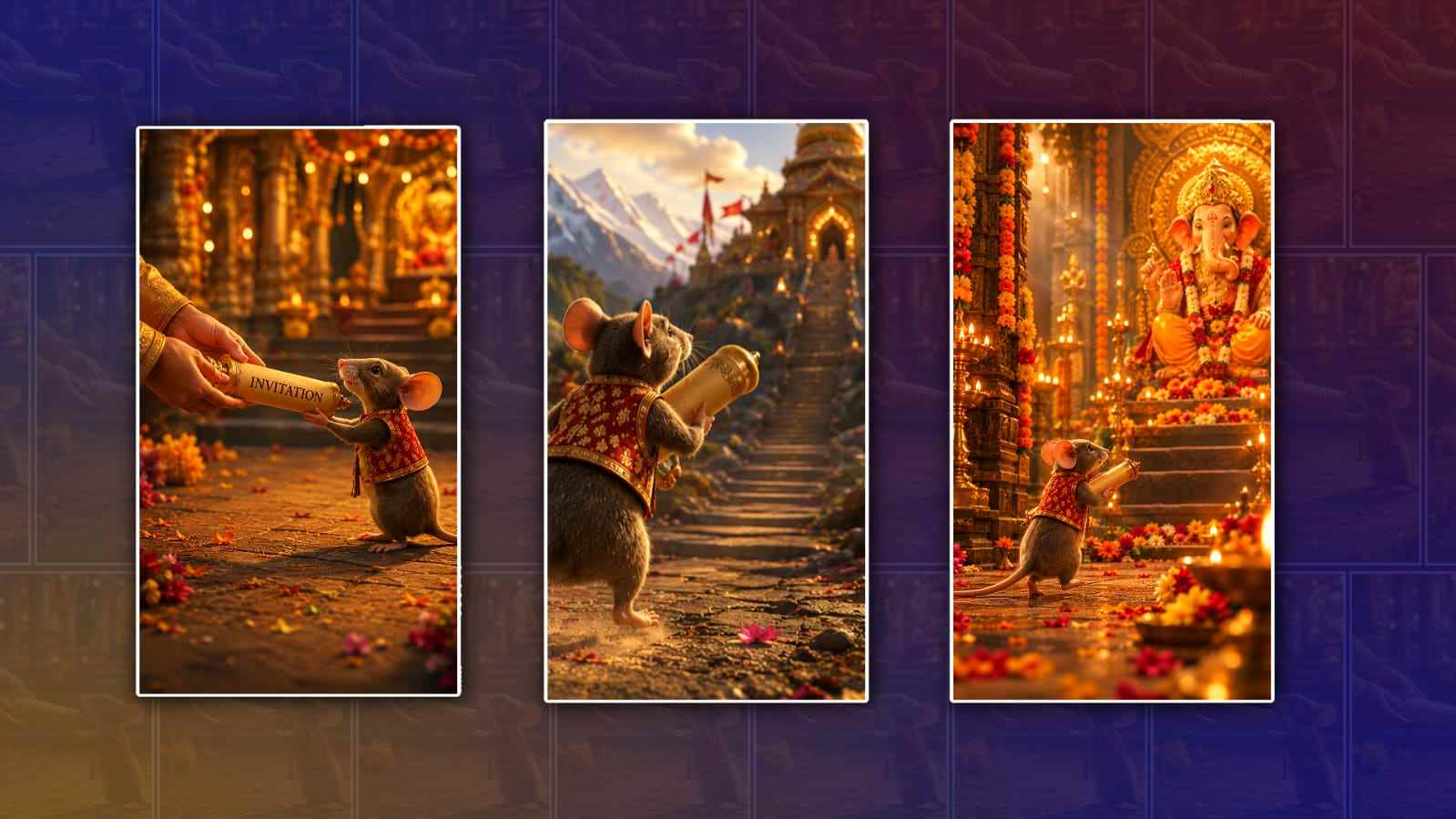
Creating a Ganesh Chaturthi invitation video does not have to be complicated or require professional video-editing skills. With Google Gemini, you can create a beautiful and personalised invitation by using simple text prompts and your own ideas. Whether you are inviting family members, friends, neighbours, or colleagues, a short devotional video can make your invitation feel much more personal and festive.
The first thing you need to decide is the overall style of your invitation video. Think about the mood you want to create. For Ganesh Chaturthi, traditional, devotional, elegant, and colourful styles work especially well. You can imagine Lord Ganesha appearing with flowers, diyas, temple bells, rangoli, and a festive background. You can also choose a modern style if you want something simple and suitable for sharing on WhatsApp, Instagram, or other social media platforms.
To begin, open Google Gemini on your phone or computer and sign in with your Google account if required. Depending on the features available in your Gemini account and region, you may be able to create or work with images and video through Gemini’s supported creative tools. Start by clearly describing what you want to create instead of simply typing something like “make a Ganesh invitation video.” The more useful details you provide, the easier it is to get a result close to your idea.
For example, you could write a prompt such as: “Create a beautiful traditional Ganesh Chaturthi invitation video. Show a divine Lord Ganesha idol decorated with flowers, a glowing diya, marigold garlands, soft golden lights, and a festive temple-inspired background. Use elegant red, orange, and gold colours. The atmosphere should be peaceful, devotional, and welcoming. Include space for invitation text and make the video suitable for sharing on WhatsApp.”
After creating the basic concept, personalise the invitation. A good invitation video should contain the important details of your celebration. These can include the host or family’s name, date, time, location, Ganesh Sthapana details, puja time, and a short invitation message. You can also mention whether there will be aarti, prasad, lunch, dinner, or other celebrations.
Instead of putting too much information on one screen, keep the text short and easy to read. For example, the opening can say “|| Shri Ganeshaya Namah ||” followed by “With the blessings of Lord Ganesha, we warmly invite you to celebrate Ganesh Chaturthi with us.” The next scene can display the date and time, followed by the venue and a closing message such as “Your presence will make our celebration even more special.”
If Gemini produces an image or visual concept instead of the complete video, do not worry. You can use the generated visuals as the foundation for your invitation and combine them with animation, music, transitions, and text using a video-editing application. This is often a practical approach because you have more control over the final timing and wording.
When writing your Gemini prompt, describe the movement you want in the video as well. For example, you can ask for a slow camera movement toward the Ganesh idol, gently moving flower petals, glowing diyas, soft light effects, and a subtle background animation. Avoid asking for too many effects at once. A devotional invitation usually looks better when the animation is calm and elegant rather than extremely fast or crowded.
You can also specify the video format. If you plan to send the invitation through WhatsApp or post it as an Instagram Reel or Story, a vertical 9:16 format is generally a good choice. You can tell Gemini that you want a vertical invitation suitable for mobile phones. If you are planning to show the video on a television or during a family event, a horizontal format may be more appropriate.
Music is another important part of a Ganesh invitation video. A soft devotional instrumental track can immediately create a festive atmosphere. You could use gentle tabla, flute, bells, or traditional devotional-style instrumental music. If you are adding music separately, make sure you have permission to use the track, especially if you plan to post the video publicly. For a personal family invitation, choosing an appropriate royalty-free or properly licensed track is a simple way to avoid copyright problems.
One useful trick is to create the invitation in several short scenes rather than trying to make everything in one prompt. For example, the first scene can introduce Lord Ganesha, the second can display the invitation message, the third can show the event details, and the final scene can give a warm closing message. This makes the video easier to organise and usually gives you greater control over the final result.
You can ask Gemini to help you write the invitation wording too. If you are not sure what to write, try a prompt such as, “Write a short and warm Ganesh Chaturthi invitation message for a family celebration. Keep it devotional, friendly, and suitable for a 15-second video.” Gemini can provide several variations, and you can choose the one that sounds most natural for your family.
You can also make the invitation feel more personal by including your own family name, photographs of your Ganesh idol, or an image of your home decoration, where supported by the tools you are using. A personalised invitation often feels more genuine than a completely generic template. Before sharing the final video, carefully check all names, dates, times, and addresses because AI-generated text can occasionally contain mistakes.
The final step is to review the entire video from beginning to end. Check whether the text stays on screen long enough to read, whether the music matches the mood, whether the visuals look respectful, and whether the invitation details are correct. If something does not look right, go back to Gemini and refine your prompt rather than starting everything from scratch.
A strong prompt might look like this: “Create a 20-second vertical Ganesh Chaturthi invitation video with a traditional Indian festive aesthetic. Begin with a beautifully decorated Lord Ganesha idol surrounded by marigold flowers and glowing diyas. Use warm golden lighting, subtle flower-petal movement, elegant transitions, and peaceful devotional visuals. Show the text ‘|| Shri Ganeshaya Namah ||’ at the beginning. Then display: ‘We warmly invite you and your family to join us for Ganesh Chaturthi celebrations.’ Leave clear space for the date, time, and venue. End with ‘Your presence will make our celebration truly special. Ganpati Bappa Morya!’ Keep the design elegant, readable, spiritual, and suitable for WhatsApp sharing.”
The biggest advantage of using Gemini for this kind of project is that you do not need to be an expert designer. You can start with a simple idea, ask Gemini to develop it, make changes to the wording and visual style, and then assemble the final version using the tools available to you. The key is to give specific instructions and refine the result until it matches the feeling you want.
In the end, a Ganesh Chaturthi invitation video is not just about impressive visuals. It is about creating a warm invitation that reflects the joy and devotion of the festival. With a thoughtful prompt, meaningful message, suitable visuals, and a little personalisation, you can create an attractive Ganesh invitation video that feels special and is easy to share with your loved ones.
SCENE 1 PROMPT
Create a 10-second ultra-realistic cinematic video in vertical 9:16. Preserve the exact composition, camera angle, human hands, mouse appearance, mouse clothing, invitation scroll, lighting and overall visual quality of the starting frame. At the beginning, the human hands remain exactly where they are and the mouse naturally reaches forward and firmly takes the invitation scroll with both hands. Once the mouse has completely received the invitation, the human hands gently release the scroll and slowly move out of the frame.

IMPORTANT MOVEMENT:
The mouse MUST then turn its body FORWARD and RUN AWAY FROM THE HUMAN HANDS, moving continuously toward the FRONT of the scene.

The mouse must NEVER walk backward. The mouse must NEVER move toward the camera. The mouse must NEVER move backward while facing the hands. Clearly show the mouse carrying the invitation securely in both hands while running FORWARD along a beautiful cinematic path. As the mouse leaves the starting location, the environment naturally transitions into a breathtaking scenic landscape with green mountains, rocky hills, waterfalls, trees, flowers and warm golden sunlight. Use a dynamic Hollywood-style tracking shot following BEHIND the mouse as it runs forward toward the distant mountains. The camera should move in the SAME DIRECTION as the mouse, smoothly following behind it. Show the mouse's back as it runs forward, with its red-and-gold vest, tail movement and the invitation clearly visible. The mouse continues running forward through the beautiful natural landscape toward a distant destination. Realistic running animation, natural leg movement, believable body motion, realistic tail movement, moving fur, subtle dust particles, wind-blown leaves and flower petals. Cinematic golden-hour lighting, volumetric sunlight, atmospheric depth, dramatic mountains, waterfalls, shallow depth of field, smooth camera tracking, premium Indian mythological cinematic style, Hollywood-level visual quality, photorealistic details.

IMPORTANT:
Do not change the first frame. Do not change the mouse. Do not change the invitation. Do not change the human hands before they leave. Do not show any face or full human body. No Lord Ganesha. No deity. No temple idol. No religious statue anywhere in Scene 1.

No sudden cuts. No teleportation. No backward movement. No walking backward. No moonwalk.  No turning around and running toward the camera. No dropping the invitation. No extra characters.

FINAL FRAME:
The mouse is running FORWARD away from the original starting location, seen from behind, holding the invitation securely with both hands, moving deeper into the beautiful mountain landscape. Hold the final frame briefly so it can be used as the START FRAME for Scene 2.
SCENE 2 PROMPT
Create a 10-second ultra-realistic cinematic devotional video in vertical 9:16.

START EXACTLY FROM THE UPLOADED FIRST FRAME.

Continue directly from the previous scene with the SAME mouse, SAME red-and-gold vest, SAME golden invitation scroll and SAME visual style. The mouse continues running forward along the beautiful mountain path carrying the invitation securely with both hands. Ahead, the mouse gradually reaches a magnificent grand Lord Ganesha temple glowing with warm golden lights. The camera smoothly follows behind the mouse as it approaches the temple. The mouse enters the temple and runs toward the majestic Lord Ganesha. The mouse stops directly in front of Lord Ganesha and respectfully offers the rolled invitation with both hands. Lord Ganesha gently reaches forward and accepts the invitation from the mouse. The mouse then moves slightly to the side and respectfully stands near Lord Ganesha. Lord Ganesha slowly opens the golden parchment invitation with both hands. The camera smoothly pushes in toward the invitation as it opens completely. When the invitation is fully opened, clearly show these EXACT details:

SRI RAMA YOUTH ASSOCIATION
REDDIPALLI

DATE: 14-09-2026
TIME: 6:00 PM

VENUE: NEAR GRAM PANCHAYATI

ORGANIZED BY:
SRI RAMA YOUTH ASSOCIATION

The text must be large, clean, correctly spelled and clearly readable on the parchment. Use an elegant antique golden parchment design with premium traditional decorative borders and beautiful dark-brown typography. The final 3 seconds should focus on the completely opened invitation facing the camera so all details are clearly visible. Warm golden divine lighting, glowing diyas, marigold garlands, flowers, floating petals, incense smoke, volumetric light rays, cinematic depth of field, realistic mouse animation, majestic Lord Ganesha, premium Indian devotional atmosphere, Hollywood-level cinematic quality, photorealistic details.

IMPORTANT:
Start exactly from the uploaded frame. Maintain perfect continuity from Scene 1. The mouse must continue moving FORWARD, never backward. Do not change the mouse's appearance or clothing. Do not change the invitation. Do not drop the invitation. No sudden cuts. No teleportation. No extra characters. No distorted hands or fingers. No text outside the invitation. Do not add, remove or change any words in the invitation.

FINAL FRAME:
Lord Ganesha holds the completely opened invitation directly toward the camera, with all event details clearly visible and readable, while the mouse respectfully stands beside him.