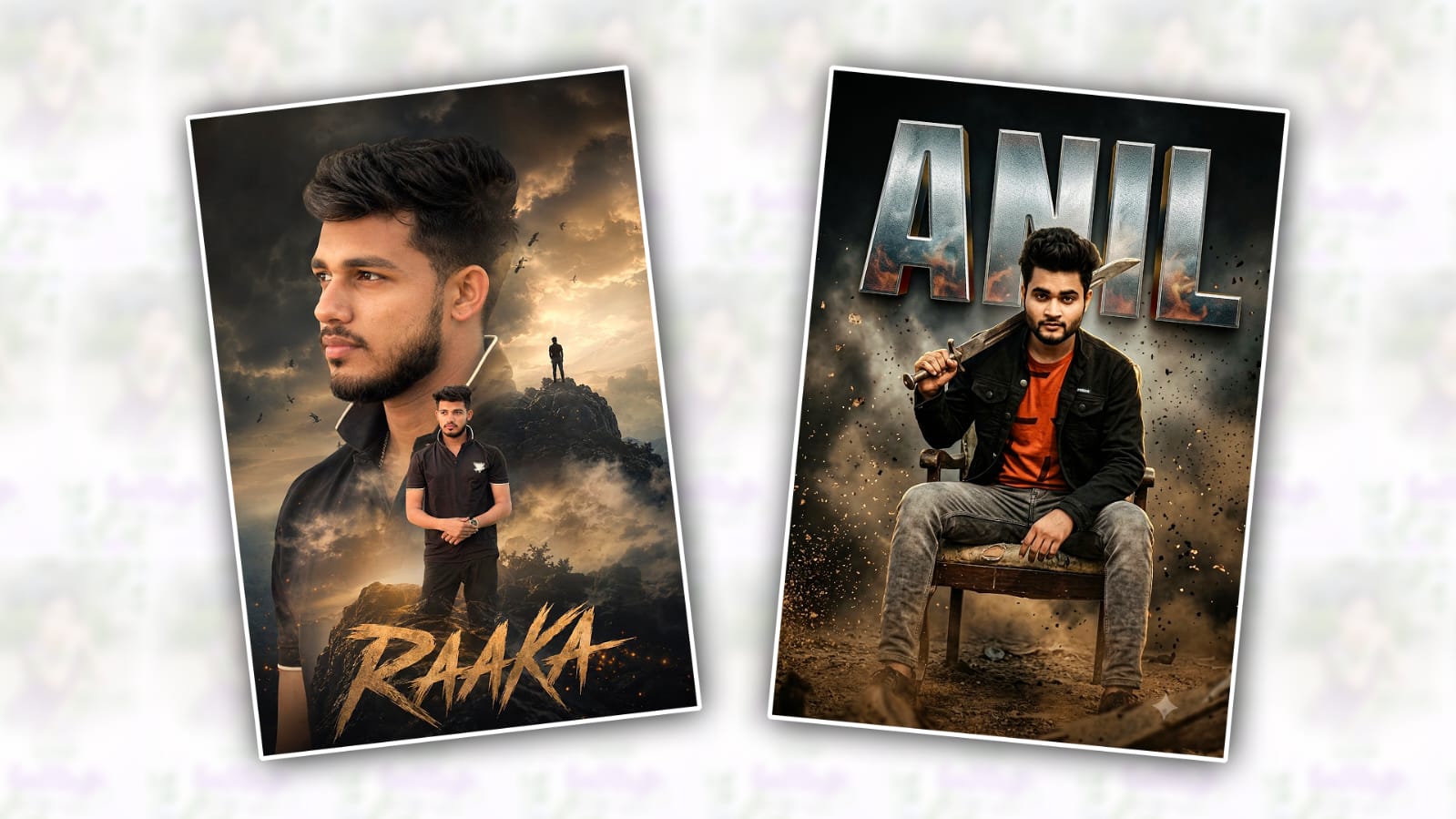
Artificial Intelligence has completely transformed the world of photo editing and digital art. What once required advanced Photoshop skills and hours of editing can now be achieved in minutes using AI tools. One of the biggest trends currently dominating social media is cinematic movie poster creation inspired by blockbuster films. Among these trending styles, the “Raaka” movie poster look has become incredibly popular due to its dark atmosphere, powerful character presence, dramatic lighting, and high-end cinematic feel.
If you’ve seen viral Instagram reels, YouTube Shorts, or Facebook posts featuring personalised “Raaka” posters, you may have wondered how creators make them so realistic. The good news is that you don’t need professional design experience. With Gemini AI, anyone can create a stunning Raaka-style cinematic poster using only a photo and a well-crafted prompt.
In this article, you’ll learn the complete process of creating a trending cinematic Raaka poster in Gemini AI.
What Makes the Raaka Poster Style Unique?
Before creating the poster, it’s important to understand what makes the Raaka aesthetic so attractive.
The Raaka movie poster trend is inspired by modern action and fantasy cinema. It usually includes:
- Dark cinematic color grading
- Intense character expressions
- Dramatic shadows and highlights
- Powerful action-movie atmosphere
- Fire, smoke, sparks, or storm effects
- Ultra-detailed facial features
- High contrast lighting
- Premium movie-poster typography
These elements combine to create a larger-than-life appearance that makes an ordinary photo look like a blockbuster film promotion.
Why Use Gemini AI for Poster Editing?
Gemini AI has become one of the most powerful AI tools for image generation and creative editing. Unlike traditional editing software, Gemini understands detailed text instructions and can generate highly realistic cinematic visuals.
Some advantages of Gemini AI include:
- Fast image generation
- Realistic cinematic effects
- Detailed character enhancement
- Easy prompt-based editing
- No advanced design skills required
- Professional-looking results
With the right prompt, Gemini can transform a normal portrait into a movie-worthy poster within minutes.
Step 1: Choose the Right Photo
The quality of your final poster depends heavily on the photo you upload.
For the best results:
- Use a high-resolution image
- Ensure your face is clearly visible
- Avoid blurry photos
- Choose a serious or confident expression
- Use good lighting
- Prefer portraits with simple backgrounds
A front-facing or slightly angled portrait usually produces the most cinematic results.
Step 2: Open Gemini AI
Visit Gemini and sign in to your account.
Upload your chosen image and select the image editing or generation feature if available in your version.
Once your image is uploaded, you are ready to provide the AI prompt.
Step 3: Use a Detailed Cinematic Prompt
The secret behind viral AI posters is not the image itself but the quality of the prompt.
A strong prompt gives Gemini clear instructions about:
- Character appearance
- Lighting style
- Mood
- Background elements
- Color grading
- Movie poster layout
Here is an example prompt:
“Create an ultra-realistic cinematic movie poster inspired by Raaka. Transform the person in the uploaded image into a powerful action hero standing in a dark fantasy battlefield. Add dramatic lighting, glowing sparks, smoke, fire particles, intense shadows, detailed facial features, realistic skin texture, cinematic colour grading, epic atmosphere, high contrast, volumetric lighting, blockbuster movie poster style, premium quality, ultra HD, realistic background, professional typography with title RAAKA at the bottom, Hollywood movie poster composition.”
This prompt helps Gemini understand exactly what style you want.
Step 4: Enhance the Cinematic Mood
If the first result looks too simple, generate another version with additional cinematic details.
You can include elements such as:
- Burning city background
- Thunderstorm effects
- Warrior armor
- Flying sparks
- Dust particles
- Dramatic clouds
- Orange and blue colour tones
- Dark fantasy environment
These details add depth and realism to the final artwork.
A richer environment often makes the poster appear more expensive and professional.
Step 5: Create Movie Poster Typography
A movie poster is incomplete without a powerful title.
You can ask Gemini to include:
- Large metallic “RAAKA” title
- Cinematic font style
- Movie credits section
- Release date text
- Production logo design
Example instruction:
“Add bold metallic RAAKA title at the bottom centre with cinematic movie typography and realistic movie credits beneath it.”
This makes the design look like an authentic theatrical poster.
Step 6: Improve Image Quality
Sometimes AI-generated images may need slight refinements.
You can ask Gemini:
- Increase sharpness
- Enhance facial details
- Improve realism
- Add cinematic depth
- Increase contrast
- Make lighting more dramatic
Example:
“Enhance realism, improve facial details, increase cinematic lighting, ultra-sharp focus, professional movie poster quality.”
Generating multiple versions often helps you find the best result.
Step 7: Download and Upscale
Once you are satisfied with the generated image:
- Download the poster.
- Use an AI upscaler if necessary.
- Increase resolution for social media posting.
- Save the image in high quality.
Higher resolution posters look better on Instagram, Facebook, YouTube thumbnails, and WhatsApp status updates.
Tips for Making Your Poster Go Viral
Many creators generate posters, but only a few achieve viral reach. Here are some tips:
Use Trending Audio
If you’re sharing on Instagram Reels or YouTube Shorts, use currently trending audio tracks.
Add Motion Effects
Convert the poster into a short cinematic video using AI animation tools.
Use Before-and-After Transitions
Show the original photo first and then reveal the AI-generated Raaka poster.
This type of content usually attracts higher engagement.
Write a Strong Caption
Example:
“What if I starred in the movie Raaka? Created entirely with AI.”
Captions that spark curiosity often perform better.
Post Consistently
The more cinematic edits you create, the higher your chances of reaching a larger audience.
Common Mistakes to Avoid
Many beginners make these mistakes:
- Using low-quality photos
- Writing short prompts
- Ignoring lighting details
- Overloading the image with effects
- Using unrealistic facial modifications
A clean, detailed, and balanced design always produces better results.
Final Thoughts
The Raaka cinematic poster trend demonstrates how powerful AI-powered creativity has become. With Gemini AI, anyone can transform a simple portrait into a professional-looking blockbuster movie poster without mastering complex editing software.
The key to success lies in choosing a good photo, writing detailed prompts, experimenting with cinematic elements, and refining the final result. As AI technology continues to evolve, creating stunning movie-poster artwork will become even easier and more accessible.
Whether you’re a content creator, social media enthusiast, designer, or simply someone who enjoys experimenting with AI art, the Raaka poster style is an excellent way to showcase creativity and produce eye-catching visuals that stand out online.
Start experimenting today, refine your prompts, and create your own epic cinematic Raaka poster that looks ready for the big screen.
Raak Poster Prompt
A Uploaded image Create a realistic dramatic double-exposure cinematic poster of a stylish upload image wearing and a same dress. The composition features a large side profile portrait dominating the background and a smaller full-body portrait centered in the foreground. High-volume same hairstyle with a clean same hair, trimmed beard, confident smile. Inside the double exposure, blend cinematic storm clouds, mist, birds flying, a distant silhouette standing on a rocky hill, and a the subject, creating a powerful and inspirational atmosphere. High contrast cinematic tones, manipulation, surreal storytelling, editorial style, movie-poster aesthetic, cinematic Telugu title typography “Raaka” space at the bottom, 8K quality. Realistic and face matching photo size 4:5
Prompt 2
Ultra-realistic cinematic South Indian mass movie poster. A young man sitting confidently on an old vintage chair wearing the original outit from the reference image. Dark smoky background with dust flying every where, surrounded by heavy smoke, ash, and dirt particles floating in the air. Massive silver metallic 3D textured letters saying”NAME” in the background. Dark black and brown color tones, high-contrast lighting, dramatic rim light, cinematic shadows, premium movie-poster color grading, ultra-detailed skin texture, realistic muscle definition, dusty ground environment, epic South Indian pan- India film look, intense atmosphere, 8K ultra HD quality, blockbuster cinematic poster style.