Creating a baby name reveal has become one of the most exciting ways for parents-to-be to share their happiness with family and friends. Instead of simply posting a text announcement, many people now prefer eye-catching 3D videos that make the reveal feel magical and memorable. Thanks to Google Gemini, creating a beautiful 3D baby name reveal video is easier than ever. Even if you have no experience with video editing or animation, Gemini can help you generate creative ideas, write cinematic prompts, and speed up the entire creative process.
One of the biggest reasons people choose Google Gemini is its ability to understand detailed instructions. You can describe the type of baby name reveal you imagine, and Gemini will generate a professional prompt that works with AI video generation tools. Whether you want a dreamy sky filled with floating clouds, a magical castle, golden balloons, sparkling lights, or an elegant floral garden, Gemini can turn your simple description into a detailed prompt that captures every visual element.
A 3D baby name reveal video creates a stronger emotional connection than a regular image or slideshow. Smooth camera movements, realistic lighting, soft background music, and cinematic effects make the final reveal feel like a short movie. Parents can customise every detail, from the baby’s name appearing in glowing golden letters to adorable teddy bears, baby shoes, hearts, stars, or colourful butterflies flying around the scene. These creative touches make the video unforgettable for everyone who watches it.
Google Gemini is especially useful because it saves time during the planning stage. Instead of spending hours thinking about how the video should look, you can simply tell Gemini your vision. For example, you can ask for a luxurious royal-themed baby name reveal, a fairy-tale forest scene, a space-inspired animation, or a peaceful sunset beach reveal. Gemini understands the style and generates a detailed prompt with cinematic camera angles, lighting instructions, colours, and visual effects that are ready to use with AI video generators.
Another advantage of using Gemini is that it helps you create videos in different artistic styles. Some parents prefer a realistic 3D animation, while others enjoy a Pixar-inspired look, fantasy art, watercolour, or animation, or soft pastel visuals. Gemini can adapt its prompts based on your preferred style, making it possible to create something unique that reflects your personality and excitement. Personalisation is one of the key reasons why AI-generated baby name reveal videos have become so popular. Every family has its own story, and Gemini allows you to include meaningful details in the prompt. You can mention the baby’s nickname, favourite colours, family traditions, cultural symbols, or even special locations that are important to you. These personalised elements make the final video feel more emotional and authentic instead of looking like a generic animation.
Many content creators also use Google Gemini to create viral short videos for social media platforms like YouTube Shorts, Instagram Reels, Facebook, and TikTok. Since short-form videos receive high engagement, a beautifully animated baby name reveal can quickly attract attention from friends, relatives, and followers. Adding smooth transitions, glowing text effects, floating particles, and emotional background music can make the reveal even more captivating.
Gemini is also helpful when you want to write a script or voice-over for the video. Instead of using plain text, you can ask Gemini to generate a heartfelt message announcing your baby’s name. A simple sentence like “Our little miracle is finally here” or “Meet the newest member of our family” becomes much more emotional when combined with cinematic visuals and soft instrumental music. These small details help create a memorable viewing experience.
One of the best features of AI-assisted creation is flexibility. If you are not satisfied with the first prompt, you can easily ask Gemini to make changes. You might want brighter lighting, slower camera movements, more realistic baby accessories, additional flower petals, golden sparkles, or dramatic cinematic lighting. Gemini quickly updates the prompt without requiring you to start from scratch. This makes the creative process much smoother and more enjoyable.
Parents also appreciate the affordability of AI-generated content. Traditional 3D animation often requires professional designers, expensive software, and several days or even weeks of work. By using Google Gemini to create detailed prompts for AI video generators, much of the planning and creative writing becomes automated. This reduces both time and cost while still producing visually impressive results.
The growing popularity of AI technology has made high-quality video creation accessible to everyone. Even beginners who have never worked with animation software can create professional-looking baby name reveal videos by combining Gemini with modern AI video generation platforms. The process usually starts with writing a detailed prompt, generating the video, adding background music, and making small edits before sharing the final result with friends and family.
Creativity has no limits when using Gemini. Some families choose magical fantasy themes featuring castles, unicorns, rainbows, and glowing stars. Others prefer elegant minimalist animations with soft white flowers, candles, and golden typography. Seasonal themes are also popular, including snowy winter landscapes, colourful autumn forests, blooming spring gardens, or sunny summer beaches. Gemini can generate prompts for virtually any creative concept you imagine.
Lighting plays an important role in making a 3D baby name reveal video look realistic. Gemini often includes cinematic lighting descriptions such as warm golden hour sunlight, soft ambient lighting, glowing particles, realistic reflections, volumetric light rays, and high-definition textures. These details help AI video generators produce more polished and visually stunning results.
Music also adds emotion to the final presentation. Gentle piano melodies, orchestral background scores, lullabies, or soft acoustic music can perfectly match the mood of the reveal. Combined with slow camera movements and realistic 3D effects, the video becomes more touching and memorable for viewers.
Another useful feature is the ability to create multiple versions of the same idea. You can generate one video for family members, another shorter version for Instagram Reels, and a vertical format optimised for YouTube Shorts or TikTok. Gemini can adjust prompts for different video lengths and aspect ratios, helping you create content suitable for every platform.
As AI technology continues to improve, creating personalised videos becomes easier, faster, and more enjoyable. Google Gemini acts as a creative assistant that transforms simple ideas into professional-quality prompts. Whether you want a luxurious golden reveal, a magical fantasy animation, a cute cartoon-style presentation, or a realistic cinematic scene, Gemini helps you organise your ideas into clear instructions that AI video generators can understand.
A beautifully crafted 3D baby name reveal video is more than just an announcement. It becomes a lasting memory that parents can watch for years and proudly share with loved ones. By combining imagination with the creative capabilities of Google Gemini, anyone can produce an emotional, visually stunning, and unforgettable baby name reveal that celebrates one of life’s happiest moments in a unique and modern way.
ALL PROMPTS
SCENE 1
Scene 1 (0–5 sec) – Heavenly Opening

Completely black screen.

Massive dark clouds slowly begin moving.

Lightning flashes and thunder strikes.

Sun rays break through the clouds.

The camera slowly flies forward into the clouds.

SFX: Deep cinematic drone, wind, distant thunder.
SCENE 2
Scene 2 (5–10 sec) – Divine Reveal

The clouds slowly part.

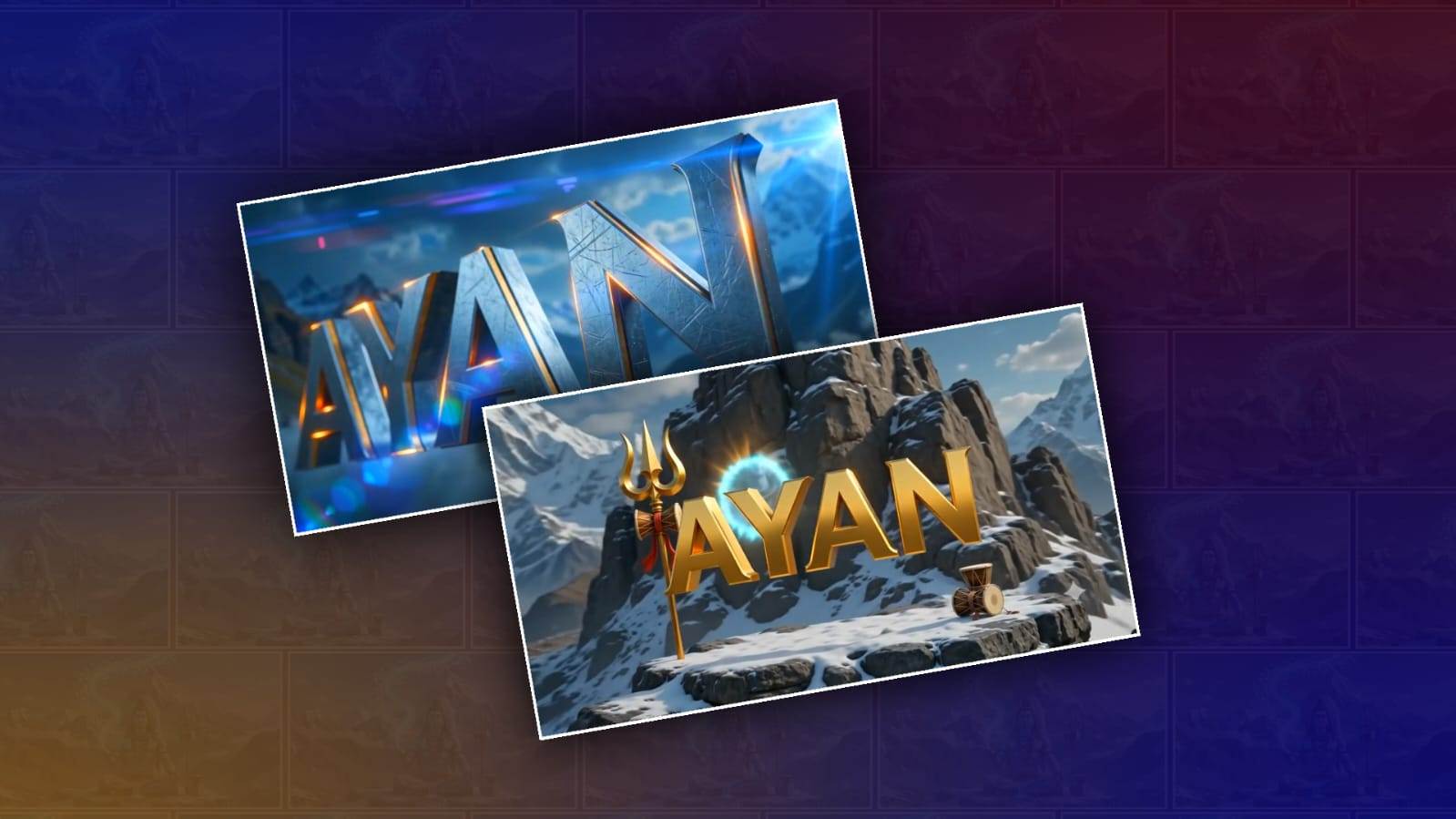
The snow-covered Mount Kailash is revealed.

Lord Shiva is seated in deep meditation.

The sacred Ganga flows from His matted hair.

The Damaru and Trishul are placed beside Him.

A divine blue aura surrounds the entire scene.

SFX: “Om Namah Shivaya” chanting, temple bells.
SCENE 3
Scene 3 (10–15 sec) – Divine Energy

Lord Shiva slowly opens His eyes.

A divine blue energy emerges from His hand.

The energy spirals through the sky, glowing brightly.

The camera performs a cinematic 360° orbit.

SFX: Energy whoosh + magical particles.
SCENE 4
Scene 4 (15–20 sec) – Letter A

The divine energy bursts outward.

The first letter A emerges in a golden 3D metallic style.

The camera circles around the letter.

Beautiful light reflections shimmer across the metal surface.

SFX: Epic Boom + Metal Impact.
SCENE 5
Scene 5 (20–22 sec) – Letter Y

The blue divine energy gathers beside the letter A.

The letter Y materialises.

Both letters glow with divine light.

SFX: Boom + Spark.
SCENE 6
Scene 6 (22–24 sec) – Letter A

With the sound of the Damaru,

The letter A forms.

All three letters float gracefully in the air.

SFX: Damaru + Energy Rise.
SCENE 7
Scene 7 (24–27 sec) – Letter N

A powerful beam of light shoots from the Trishul.

The final letter N is created.

The complete name AYAN is now fully revealed.

SFX: Divine Explosion + Temple Bells.
SCENE 8
Scene 8 (27–30 sec) – Final Hero Shot

The camera slowly circles around the complete name.

Lord Shiva stands in the background, blessing the name.

The name shines with a brilliant blue and gold glow.

The screen slowly fades to black.

SFX: Choir + Temple Bells + Deep Cinematic Bass.
SINGLE VIDEO PROMPT
Create a 10-second ultra-realistic cinematic landscape (16:9) animation with seamless transitions, continuous motion, and Hollywood-quality VFX.
0–2 sec – Heavenly Opening
Begin with a completely black screen. Massive dark storm clouds rapidly move across the sky with intense lightning, thunder, and powerful god rays breaking through. The camera quickly flies through the clouds toward Mount Kailash.
SFX: Deep cinematic drone, wind, distant thunder.
2–4 sec – Divine Reveal
The clouds separate to reveal the majestic snow-covered Mount Kailash. Lord Shiva sits in deep meditation beside a glowing black Shiva Lingam. The sacred Ganga flows from His matted hair. The Trishul and Damaru stand beside Him. Blue divine light, sacred mist, floating glowing particles, and volumetric lighting fill the scene. Shiva slowly opens His eyes and raises His hand.
SFX: "Om Namah Shivaya" chanting, temple bells, Energy Whoosh.
4–8 sec – Divine Name Creation
A powerful stream of blue divine energy bursts from Shiva's hand, swirling through the sky. The energy rapidly transforms into giant metallic 3D letters in sequence: A → Y → A → N. Each letter appears with realistic metallic textures, glowing blue and golden edges, sparks, volumetric lighting, cinematic camera rotation, slow-motion impact effects, and magical particles.
SFX: Energy Whoosh, Epic Boom, Metal Impact, Spark, Damaru, Energy Rise.
8–10 sec – Final Hero Shot
The complete name "AYAN" floats majestically before Lord Shiva. Divine rays illuminate the mountains while the camera performs a smooth cinematic orbit around the glowing name. End with a dramatic close-up and slow fade to black.
SFX: Divine Explosion, Temple Bells, Choir, Deep Cinematic Bass.
Style: Ultra-realistic, HDR, 8K, Hollywood VFX, photorealistic lighting, realistic motion blur, volumetric fog, depth of field, premium cinematic color grading, seamless animation, realistic physics, no watermark, no extra text except "AYAN".