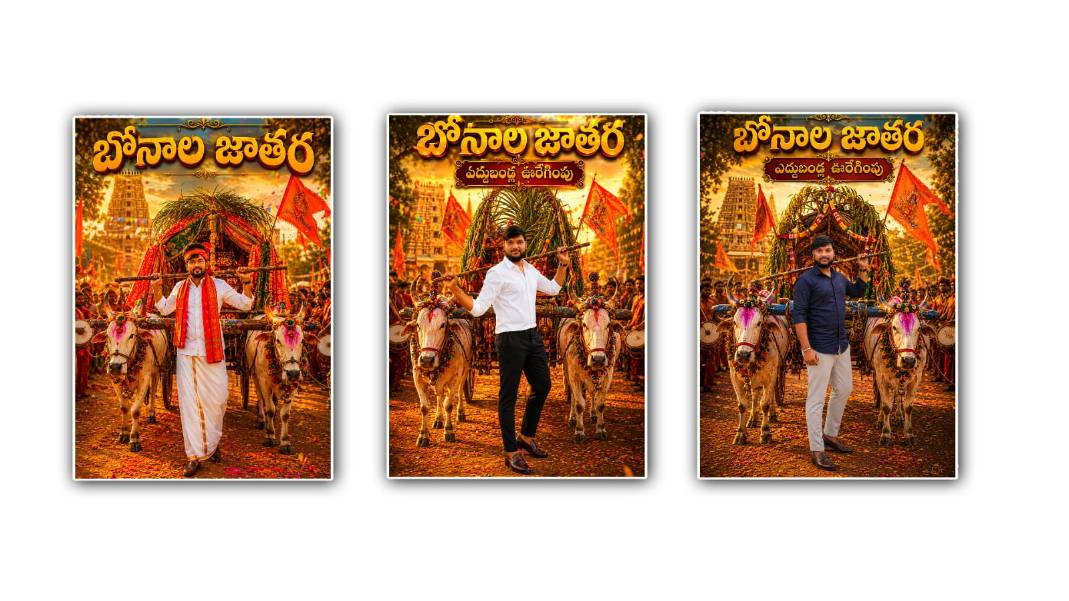
Bonalu is one of the most colourful and culturally rich festivals celebrated in Telangana. Every year, thousands of devotees participate in the celebrations by offering Bonam to Goddess Mahakali, dressing in traditional attire, and taking part in grand processions. During the festival, social media is filled with beautiful photos, creative posters, and artistic edits that showcase the spirit of Bonalu. In recent times, artificial intelligence has made photo editing much easier, and one of the most exciting tools people are using is Google Gemini. Instead of learning complicated editing software or spending hours creating designs, anyone can now create stunning Bonalu festival-themed images simply by giving the right instructions to AI.
Google Gemini is designed to understand natural language, which means you don’t need professional editing skills to create attractive festival images. You only need a clear idea of the type of image you want, describe it in detail, and Gemini can generate creative concepts or help produce AI-powered visuals depending on the features available in your version. This makes it an excellent choice for beginners, content creators, students, photographers, and social media users who want unique Bonalu festival edits without spending money on professional software.
The first step is to choose a good photograph. A high-quality image with proper lighting always produces better results. Whether it is a selfie, a portrait in traditional dress, or a family picture taken during the festival, selecting a clear photo helps the AI understand facial details and maintain a realistic appearance. Images with a simple background are usually easier to edit because the AI can replace or enhance the surroundings more effectively.
Once you have selected your photo, open Google Gemini and access the image generation or editing feature if it is available in your account. Upload your picture and start writing a detailed prompt. The quality of your final image depends largely on how well you describe the scene. Instead of writing a simple sentence like “Make this Bonalu festival photo,” explain everything you want to see in the final image. Mention traditional decorations, temple atmosphere, colourful flowers, bright lighting, festive colours, and cultural elements that represent Bonalu celebrations.
For example, you can write a prompt such as: “Transform this portrait into a realistic Bonalu festival scene with a beautifully decorated Mahakali temple in the background, colourful flower decorations, golden lighting, traditional Telangana festival atmosphere, vibrant marigold garlands, devotees carrying Bonam, festive smoke effects, realistic skin tones, detailed traditional clothing, cinematic lighting, and ultra HD quality.” A detailed prompt like this gives Gemini enough information to generate a visually appealing result.
If you want your image to look more professional, include words that describe the quality and artistic style. Terms like realistic, ultra HD, cinematic, DSLR quality, vibrant colours, sharp focus, natural lighting, highly detailed, and professional photography can significantly improve the output. However, avoid adding too many unrelated effects because excessive instructions may confuse the AI and produce an unnatural image.
Many people also like to create personalised festival posters with their names or social media branding. You can ask Gemini to leave empty space for text or create a poster layout that allows you to add greetings later. If text generation inside the image is not accurate, you can download the generated picture and add the greeting separately using a simple editing app. This approach gives you more control over the final design while still benefiting from AI-generated artwork.
Traditional clothing plays an important role in Bonalu-themed images. Women often wear colourful silk sarees with traditional jewellery, while men may appear in white dhotis, kurtas, or other festive outfits. If your original photo does not include festival attire, you can describe the clothing you want in your prompt. Gemini can often create a traditional appearance while maintaining the person’s identity. You can also mention accessories such as jasmine flowers in the hair, gold jewellery, bangles, bindis, and decorative ornaments to enhance the cultural authenticity of the image.
Background selection also makes a significant difference. A plain background can be transformed into a magnificent temple entrance decorated with flowers, traditional lamps, colourful rangoli, and festival crowds. You can request a sunrise or evening lighting effect depending on your preferred mood. Warm golden lighting usually creates a festive and spiritual atmosphere, while colourful lighting can make the image more vibrant for social media sharing.
If you are creating content for Instagram, Facebook, WhatsApp, or YouTube thumbnails, you can specify the image orientation in your prompt. Ask for a portrait layout for Instagram stories, a square format for posts, or a landscape image for YouTube banners. Mentioning the desired aspect ratio helps generate images that fit the platform more effectively.
Sometimes the first result may not look exactly as you imagined. This is completely normal when working with AI. Instead of starting over, modify your prompt by adding more details or removing unnecessary instructions. You can request changes such as brighter colours, sharper facial features, more realistic lighting, additional flower decorations, or a different temple background. AI image generation often improves after a few refinements, so experimenting with prompts is part of the creative process.
You can also use Gemini to generate creative Bonalu festival greeting ideas alongside your images. A simple festive message like “Wishing you and your family a joyful and blessed Bonalu filled with happiness, prosperity, and divine blessings” can make your post more meaningful. Pairing a beautiful AI-generated image with a heartfelt greeting creates engaging content that friends and family will appreciate.
While creating festival edits, it is important to respect cultural traditions. Bonalu is a deeply religious festival, so your prompts should reflect dignity and authenticity rather than exaggerated or inappropriate visual effects. Using realistic temple settings, traditional clothing, and respectful poses helps preserve the cultural significance of the celebration while producing visually attractive artwork.
Another useful tip is to save your successful prompts. Once you find a prompt that produces excellent results, keep it for future festivals or similar cultural events. You can simply change the festival name or adjust the decorations to create images for other occasions without writing everything again from scratch. Building a collection of high-quality prompts can save time and improve consistency across your social media posts.
If you want even more creative control, you can combine Gemini with basic photo editing applications. Generate the main festival artwork using AI, then adjust brightness, contrast, saturation, or add decorative text using another editing app. This combination allows you to achieve professional-looking results while keeping the editing process simple and accessible.
Artificial intelligence has changed the way people create digital artwork, making advanced editing available to everyone regardless of experience. Google Gemini offers an easy and creative way to produce Bonalu festival photo edits that look vibrant, festive, and visually impressive. With a clear photo, a detailed prompt, and a little experimentation, you can create beautiful images that celebrate the spirit of Bonalu and share them with friends, family, and followers. As AI technology continues to improve, personalised festival artwork will become even more realistic and enjoyable, allowing everyone to express their creativity while honouring the traditions and cultural beauty of the Bonalu festival.
Prompt 1
Use ONLY my uploaded photo as the reference. ABSOLUTE IDENTITY LOCK (Highest Priority): The uploaded person must remain the same. Do NOT generate another face. Preserve the uploaded face with 100% facial accuracy. Keep the exact hairstyle. Keep the exact beard. Keep the exact skin tone. Keep the exact facial proportions. Keep the exact expression. Keep the exact shirt. Keep the exact pants. Keep the exact shoes. Keep the exact accessories. Keep the exact clothing colours. Do NOT replace, redesign or enhance the outfit. Only change the body pose. The person is standing heroically between two decorated white festival bulls while holding the wooden bullock-cart pole across both shoulders. Behind him is a beautifully decorated traditional Edla Bandla cart. Temple Gopuram. Bonalu festival crowd. Orange devotional flags. Flower petals. Golden sunset lighting. Ultra-realistic. Luxury cinematic HDR. The person is looking directly at the camera. Top Telugu Title బోనాల జాతర Subtitle ఎడ్ల బండ్ల ఊరేగింపు Premium 3D metallic gold Telugu typography. Vertical 4:5 8K DSLR quality.
Prompt 2
Use ONLY my uploaded photo. Identity Lock is the highest priority. Never change Face Hair Beard Dress Pant Shoes Accessories Colours Everything must remain identical to the uploaded image. Only recreate a stylish pose where the person carries one side of the wooden cart pole on the shoulder while standing confidently between the decorated bulls. The decorated bullock cart remains behind. Bonalu temple. Festival crowd. Orange flags. Dappu artists. Golden cinematic lighting. The person looks directly at the camera. Top Title బోనాల జాతర Subtitle ఎడ్ల బండ్ల ఊరేగింపు Luxury gold Telugu typography. Ultra-realistic. 8K. Vertical 4:5.
Prompt 3
Use ONLY my uploaded face as the reference. IMPORTANT: Replace ONLY the face with my uploaded face. Do NOT use my uploaded clothes. Keep the traditional white dhoti the same. Keep the white shirt the same. Keep the red traditional shawl the same. Keep the traditional Bonalu headband the same. Keep the brown shoes the same. Only replace the face while matching the hairstyle naturally. The person walks confidently carrying the wooden cart pole across both shoulders. Two decorated white bulls. Traditional decorated bullock cart. Temple Gopuram. Bonalu crowd. Orange flags. Flower petals. Golden sunset. Luxury cinematic lighting. Top Title బోనాల జాతర Subtitle ఎడ్ల బండ్ల ఊరేగింపు Premium gold Telugu typography. Ultra realistic. 8K. Luxury festival poster.
Prompt 4
Use ONLY my uploaded face as the reference. Replace ONLY the face. Everything else must remain exactly like the reference poster. Keep Traditional white dhoti White shirt, red shaw, headband, shoes, bullockk cart, decorated bull, background, festivall decorations, Temple Lighting Exactly the same. Only the face should become my uploaded face. Blend naturally with matching skin tone. The person is carrying the wooden cart pole over one shoulder in a stylish heroic pose. Looking confidently toward the camera. Top Title బోనాల జాతర Subtitle ఎడ్ల బండ్ల ఊరేగింపు Luxury metallic gold Telugu typography. Ultra realistic. 8K. Premium cinematic festival poster. Vertical 4:5.