Have you ever watched a video where a Lamborghini races through beautiful streets, mountain roads, or futuristic cities and wondered how it was created? A few years ago, making such cinematic videos required expensive cameras, professional drivers, and a large production team. Today, artificial intelligence has changed everything. Anyone with a creative idea and the right AI tools can create realistic Lamborghini driving videos without owning the car or hiring a film crew.
AI video generation has become incredibly advanced. It can transform simple text descriptions into stunning visuals that look almost like real footage. Whether you want to create content for YouTube, Instagram Reels, TikTok, Facebook, or simply explore your creativity, AI makes the process much easier and faster than traditional video production.
The first step is deciding what kind of Lamborghini driving video you want to create. Think about the location, weather, lighting, camera angles, and the style of driving. For example, you might imagine a bright yellow Lamborghini Aventador speeding along a coastal highway during sunset. Another idea could be a black Lamborghini Huracán drifting through neon-lit city streets at night. Having a clear vision before generating your video helps AI produce better results.
Next, choose an AI video generator that supports text-to-video or image-to-video creation. Several AI platforms now allow users to generate realistic videos from simple prompts. Some tools are better for cinematic scenes, while others focus on animation or realistic movement. Explore different platforms to see which one matches your creative goals and budget.
Writing an effective prompt is one of the most important parts of the process. AI depends on your description to understand what you want. Instead of writing a short sentence like “Lamborghini driving,” provide detailed instructions. Mention the car model, colour, environment, time of day, weather conditions, camera movements, road type, and overall mood. For example, you can describe a bright orange Lamborghini Revuelto driving quickly on a winding mountain road during golden hour, with cinematic drone shots, realistic reflections, smooth camera tracking, and high-quality 4K visuals. The more descriptive your prompt is, the more impressive the final result usually becomes.
Camera movement plays a huge role in making the video feel professional. AI tools often understand terms such as aerial drone shot, low-angle tracking shot, close-up wheel rotation, dashboard view, side tracking camera, slow-motion sequence, and overhead cinematic view. Mixing different camera angles creates a more dynamic and engaging driving video. A combination of wide landscape shots and close-up details can make the final video feel like a luxury car commercial.
Lighting is another factor that dramatically affects realism. Soft morning sunlight creates a calm atmosphere, while golden-hour lighting adds warmth and luxury. Night scenes filled with colourful neon reflections can make the Lamborghini look futuristic. Rainy roads with water reflections also produce dramatic visuals that AI generators often recreate beautifully. Choosing the right lighting style gives your video a professional cinematic appearance.
Many AI creators first generate a realistic image before turning it into a moving video. This approach gives more control over the final look. You can create a high-quality Lamborghini image using an AI image generator and then upload it into an AI image-to-video tool that animates the vehicle naturally. The AI adds movement such as driving forward, turning corners, changing camera angles, or accelerating down the road.
Motion settings are equally important. A smooth driving sequence looks much more realistic than sudden or unnatural movements. When using AI tools, choose settings that emphasise fluid motion, realistic vehicle physics, and cinematic transitions. If the platform allows motion intensity adjustments, moderate values often produce the best results because they avoid unrealistic or exaggerated movement.
The background environment should complement the luxury nature of a Lamborghini. Beautiful mountain highways, coastal roads, modern city skylines, desert landscapes, racing circuits, luxury neighbourhoods, or futuristic smart cities all work exceptionally well. AI generators usually create more appealing visuals when the surroundings match the premium image associated with high-performance sports cars.
Sound effects make a significant difference even if AI generates only silent video. Adding realistic engine sounds, tyre noise, wind effects, and ambient background audio during editing increases immersion. Royalty-free music with energetic electronic beats or cinematic orchestral themes also enhances the overall viewing experience. Good audio often makes viewers believe the video is more realistic.
After generating the video, spend some time editing it. Trim unnecessary scenes, improve colour grading, stabilise any rough motion, and add smooth transitions between clips. Editing software can also increase sharpness, adjust brightness, improve contrast, and apply cinematic filters. These finishing touches make AI-generated content look much more polished and professional.
If your AI platform creates short clips, combine multiple sequences into a longer story. Begin with an establishing shot of the Lamborghini parked in an attractive location. Follow it with close-up shots of the headlights, wheels, and interior before transitioning into exciting driving scenes. End the video with a dramatic sunset shot or a slow-motion parking sequence. This storytelling approach keeps viewers engaged from beginning to end.
Creating multiple versions is often worth the extra time. AI generation can produce different results from the same prompt. Small changes in wording, camera movement, or lighting may significantly improve realism. Experiment with various prompts until you achieve the style you envision. Many experienced creators generate several clips before selecting the best ones for the final edit.
Resolution is another important consideration. If your AI tool supports Full HD or 4K output, choose the highest quality available. High-resolution videos look sharper on large screens and perform better on social media platforms that prioritise premium-quality content. Smooth frame rates also improve the appearance of fast-moving vehicles.
When sharing your AI-generated Lamborghini driving video online, be transparent if the content is synthetic, especially if viewers could mistake it for real footage. Clearly indicating that a video was created with AI helps avoid confusion and builds trust with your audience. It also highlights your creative skills rather than implying that the footage is authentic.
Practice is the key to mastering AI video creation. Your first attempt may not look perfect, but every new project teaches you how prompts influence results. Over time, you’ll learn which descriptions produce realistic reflections, smoother driving, better lighting, and more cinematic camera movements. Prompt writing becomes a creative skill that improves with experience.
AI technology continues to evolve rapidly, introducing better realism, longer video generation, improved motion consistency, and more advanced editing features. What once required expensive filmmaking equipment can now be accomplished from a personal computer with the help of artificial intelligence. This opens exciting opportunities for content creators, marketers, designers, educators, and automotive enthusiasts who want to produce eye-catching visual content.
Creating a Lamborghini driving video with AI is no longer limited to professionals. With a creative idea, detailed prompts, quality AI tools, thoughtful editing, and a little experimentation, anyone can produce visually impressive videos that capture the excitement and elegance of one of the world’s most iconic supercars. Whether your goal is entertainment, education, social media growth, or simply exploring the possibilities of AI, the process is enjoyable, accessible, and full of creative potential.
Video Prompt
Create a 10-second ultra-realistic cinematic AI video in vertical 9:16 using my uploaded photo as the ONLY identity reference.
STRICT IDENTITY LOCK:
Use my uploaded photo as the exact identity reference. Preserve my face, facial structure, skin tone, beard, hairstyle, hair colour, expression, shirt, pants, shoes, accessories, and body exactly as they appear in the uploaded photo. Do NOT change, beautify, replace, or stylise anything. No face swap, no clothing changes, no hairstyle changes, and no identity modifications.
Vehicle:
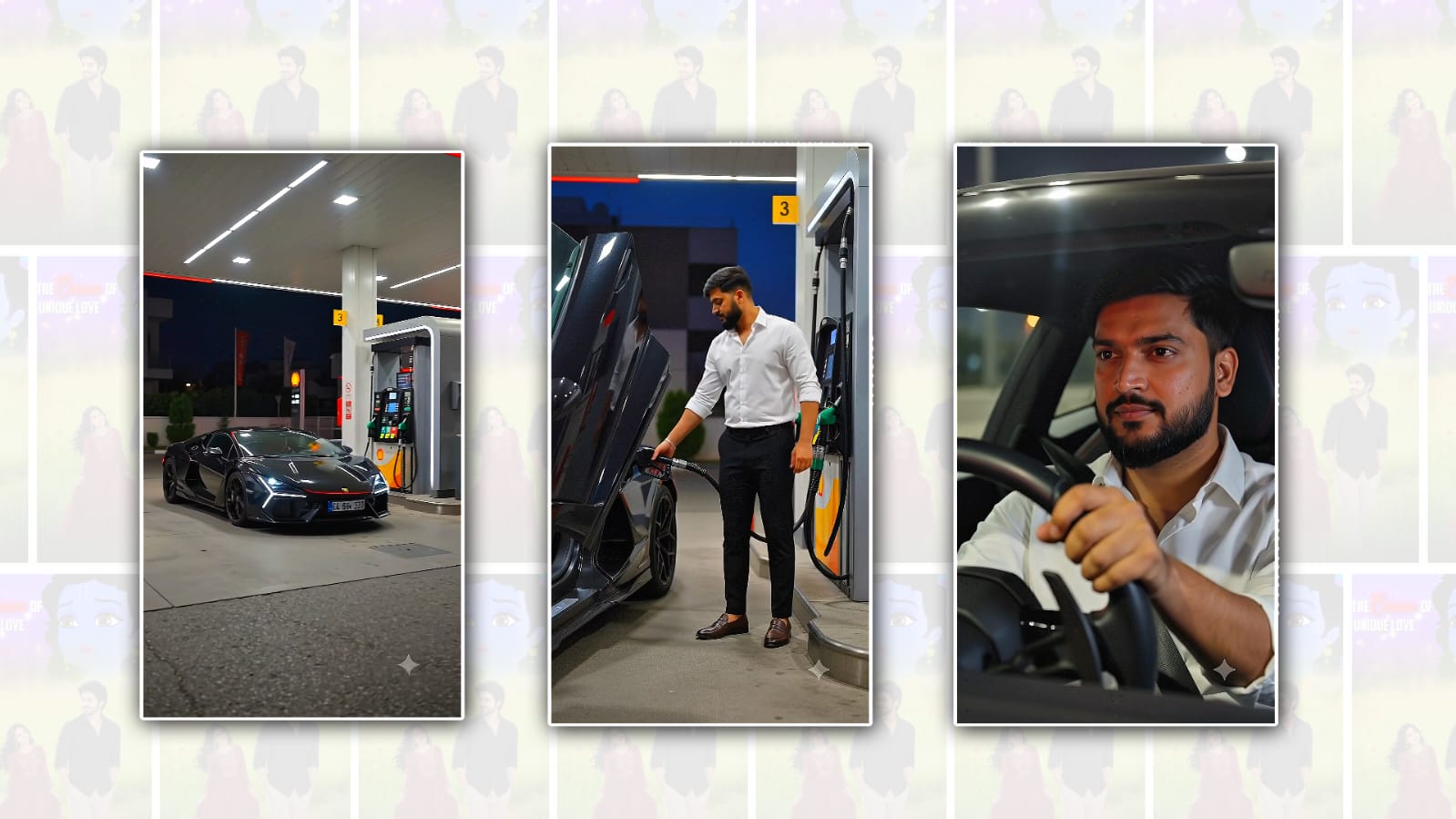
A premium glossy black Lamborghini Revuelto with realistic details, signature scissor doors, luxury interior, and cinematic reflections.
Duration:
Exactly 10 seconds. Fast-paced cinematic editing with smooth transitions.
0.0–2.0 Seconds:
A black Lamborghini Revuelto rapidly enters a modern premium fuel station and stops beside a fuel pump.
2.0–4.5 Seconds:
The scissor door opens. I step out, quickly refuel the Lamborghini, return the nozzle, close the fuel cap, and immediately get back into the driver's seat.
4.5–7.0 Seconds:
I press the start button, the Lamborghini engine roars, and the car launches out of the fuel station with aggressive acceleration onto a modern highway.
7.0–10.0 Seconds:
A clear interior cinematic close-up shows my face while confidently driving. The camera then switches to an exterior tracking shot as the black Lamborghini speeds down the highway and disappears into the distance.
Style:
Ultra-realistic, cinematic movie quality, photorealistic, DSLR look, HDR, 4K, premium colour grading, realistic lighting, realistic reflections, smooth camera movement, dynamic tracking shots, realistic driving physics, luxury lifestyle, natural motion blur, high-speed cinematic action.
Negative Prompt:
No face changes, no hairstyle changes, no beard changes, no clothing changes, no body changes, no extra people, no cartoon effect, no low quality, no blur, no glitches, no distorted hands, no identity mismatch.