If you’ve been scrolling through social media lately, you’ve probably noticed stunning AI-generated images of Lord Krishna appearing everywhere. From realistic portraits of Krishna playing the flute under the moonlight to artistic depictions with peacocks, cows, lotus flowers, and divine blue skin, these images are gaining millions of views across Instagram, Facebook, YouTube Shorts, and Pinterest. Many people are creating these images using Google’s Gemini AI by writing detailed prompts that guide the AI to produce beautiful, high-quality artwork.
Creating a trending Lord Krishna photo in Gemini is easier than many people think. You don’t need to be a graphic designer or have advanced editing skills. The most important part is writing a clear and creative prompt that tells Gemini exactly what kind of image you want. The better your description, the more impressive the final result will be.
Before creating your image, think about the style you want. Some people prefer a realistic cinematic look, while others like digital paintings, watercolour art, fantasy illustrations, or ultra-HD devotional portraits. Deciding on the style first helps Gemini understand your vision more accurately.
Start by describing Lord Krishna in detail. Mention his divine blue skin, peaceful smile, expressive eyes, yellow silk garments, peacock feather crown, flute, jewellery, and other traditional elements. Adding these details makes the generated image look authentic and visually appealing.
The background is just as important as Krishna’s appearance. You can ask Gemini to place Lord Krishna in Vrindavan surrounded by lush green forests, blooming flowers, the Yamuna River, grazing cows, and colourful peacocks. If you want something more dramatic, request a glowing sunset, moonlit night, heavenly clouds, golden light rays, or a mystical temple atmosphere. Rich backgrounds often make AI images more engaging and shareable.
Lighting plays a huge role in making AI-generated images look professional. Instead of simply asking for a picture of Lord Krishna, describe the lighting with phrases like “golden hour sunlight,” “soft divine glow,” “ethereal lighting,” “volumetric light rays,” or “cinematic illumination.” These small additions can dramatically improve the quality of the generated image.
Many creators also include camera-style descriptions in their prompts. Words such as “ultra-realistic,” “8K resolution,” “highly detailed,” “professional photography,” “sharp focus,” “depth of field,” and “HDR quality” encourage Gemini to produce images with enhanced realism and finer details. Although these are artistic descriptions rather than technical camera settings, they often help create more polished results.
If your goal is to create a viral image for Instagram or Facebook, consider choosing a vertical composition. Portrait-oriented images usually perform better on mobile devices because they occupy more screen space while users scroll through their feeds. You can mention that you want a vertical composition with a centred portrait of Lord Krishna for social media.
Colours also contribute to the emotional impact of the image. Warm golden tones create a peaceful devotional atmosphere, while cool blue shades emphasise Krishna’s divine presence. Vibrant flowers, green landscapes, glowing halos, and colourful skies make the overall artwork more eye-catching without overwhelming the central subject.
One reason some AI-generated Krishna images become popular online is that they tell a story instead of showing a simple portrait. You might ask Gemini to depict Lord Krishna playing the flute while birds gather around him, cows peacefully graze nearby, and devotees watch with admiration. Scenes that evoke emotion often connect more strongly with viewers and encourage them to share the artwork.
Experimentation is an important part of the creative process. Don’t expect your first prompt to generate the perfect image. Try changing the background, lighting, artistic style, camera angle, or colour palette. Sometimes a small change, such as replacing daylight with moonlight or adding floating flower petals, completely transforms the final result.
If you want a modern artistic interpretation, you can combine traditional devotional elements with contemporary digital art styles. For example, you might request glowing particles, fantasy landscapes, dreamy skies, or cinematic colour grading while still maintaining respect for Lord Krishna’s traditional appearance. This balance often creates visually unique artwork that attracts attention online.
Many creators also improve their prompts by specifying facial expressions and emotions. Instead of simply saying “Lord Krishna smiling,” describe a calm, compassionate, divine smile with peaceful eyes radiating love and wisdom. Emotional details help the AI create images that feel more lifelike and spiritually meaningful.
When generating devotional artwork, it’s important to approach the subject respectfully. Lord Krishna holds deep religious significance for millions of people around the world. Avoid prompts that depict sacred figures in inappropriate, offensive, or disrespectful situations. Focusing on traditional symbolism, spirituality, and artistic beauty helps create images that people appreciate and share positively.
Another useful technique is adding environmental details that enhance realism. Mention gentle wind moving Krishna’s garments, floating flower petals, butterflies, soft mist, sparkling water reflections, glowing lamps, or birds flying across the sky. These subtle additions give the scene depth and movement, making the image appear more dynamic.
After generating an image, carefully review the details. AI-generated artwork occasionally produces small imperfections in jewellery, fingers, clothing, or facial features. If something doesn’t look right, revise the prompt and regenerate the image. Many experienced AI artists generate several versions before selecting their favourite.
If you’re creating content for social media, pairing the final image with a meaningful devotional caption can increase engagement. A thoughtful quote about love, compassion, wisdom, or devotion often resonates with viewers more than a simple description. Combining beautiful visuals with heartfelt words creates a stronger emotional connection.
One effective prompt example could be: “Create an ultra-realistic portrait of Lord Krishna with radiant blue skin, wearing yellow silk garments, an elegant peacock feather crown, and intricate golden jewellery while playing a wooden flute in the peaceful forests of Vrindavan. Surround him with blooming lotus flowers, graceful peacocks, white cows, soft golden sunlight filtering through the trees, glowing divine aura, cinematic lighting, highly detailed facial features, vibrant colours, 8K quality, realistic textures, and a serene spiritual atmosphere.”
Remember that no single prompt guarantees a perfect result every time. AI image generation is a creative process where experimenting with wording leads to different artistic outcomes. You can continue refining your prompt by adjusting details, adding new visual elements, or changing the artistic style until you create an image that matches your imagination.
As AI technology continues to improve, creating devotional artwork has become more accessible than ever. Gemini allows anyone with creativity and patience to transform simple text descriptions into visually stunning images. Whether you’re creating artwork for personal inspiration, festive celebrations, devotional posts, or social media content, thoughtful prompts and respectful creativity can help you produce beautiful Lord Krishna images that capture attention while honouring the spiritual significance of the subject.
With practice, you’ll learn which prompt styles produce the most realistic lighting, expressive faces, vibrant colours, and cinematic compositions. Each new attempt teaches you how Gemini interprets different descriptions, making it easier to generate increasingly impressive artwork. The key is to stay creative, experiment with descriptive language, and always approach devotional themes with sincerity and respect. Over time, you’ll be able to create Lord Krishna images that are not only visually striking but also emotionally meaningful and widely appreciated across digital platforms.
Prompt 1
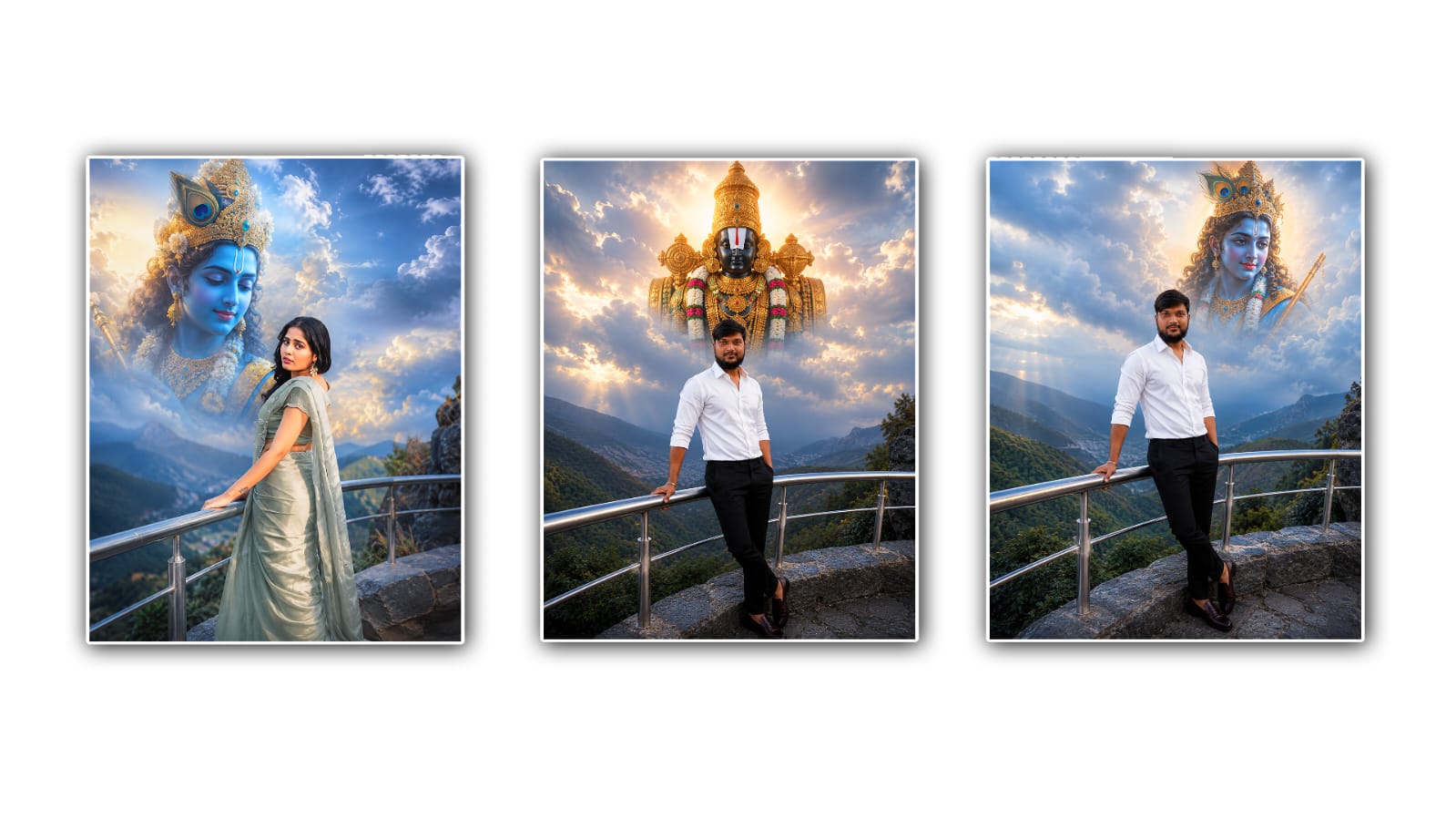
A Uploaded Create an ultra-realistic devotional Use my uploaded photo as the only human subject with 100% facial accuracy. Preserve my face exactly as it is no Al face modification, no beautification, no hairstyle changes, no skin smoothing. Place me standing naturally while leaning against a modern silver metal railing on a rocky viewpoint, wearing an oversized same same dress, and a peaceful expression. Above me in the soft blue cloudy sky, create a large divine portrait of Lord Krishna with glowing blue skin, a peacock feather crown, golden jewelry, a gentle smile, and heavenly light. Position Lord Krishna slightly above and beside me, making it appear that He is lovingly watching over me. Blend the clouds naturally around Lord Krishna for a realistic heavenly effect. Add distant mountains, soft greenery, cinematic blue-hour lighting, dreamy atmosphere, volumetric light rays, shallow depth of field, realistic colors, DSLR photography, 85mm lens, HDR, ultra-realistic, 8K, premium Instagram aesthetic, no text, no watermark, photorealistic masterpiece. 4:5
Prompt 2
Use the uploaded photo as the only identity reference. Preserve the person's face with 100% facial accuracy. Do not modify the face, facial structure, beard, hairstyle, hair color, skin tone, expression, body proportions, or clothing. Keep the same white full-sleeve shirt (sleeves folded), black formal trousers, brown loafers, bracelet, and overall appearance exactly as in the uploaded image.
Create an ultra-realistic devotional portrait in 4:5 vertical ratio. The person is standing naturally while leaning against a modern polished silver stainless-steel railing on a rocky mountain viewpoint, with one hand resting on the railing and the other hand in the trouser pocket, maintaining a calm and peaceful expression.
Above the person, filling the soft blue cloudy sky, create a majestic Lord Venkateswara Swamy (Tirumala Srinivasa) in His divine form with a black stone complexion, sacred white-and-red Tirunamam, magnificent golden crown, traditional golden ornaments, flower garlands, silk attire, radiant golden aura, and heavenly light. Position the deity slightly above and behind the person so it appears that Lord Venkateswara Swamy is lovingly watching over and blessing him.
Blend the deity naturally into the clouds with realistic atmospheric perspective, volumetric god rays, glowing clouds, soft mist, and seamless heavenly lighting. Add distant green mountains, deep valleys, soft greenery, cinematic blue-hour ambiance, realistic HDR lighting, dreamy atmosphere, shallow depth of field, DSLR photography, 85mm lens, f/1.8, ultra-realistic textures, natural colors, premium Instagram aesthetic, 8K photorealistic masterpiece, no AI face modification, no beautification, no skin smoothing, no text, no watermark.