Artificial intelligence has made it easier than ever to transform ordinary photos into creative and professional-looking images. One of the most popular trends is creating agriculture- or farming-themed pictures where it looks like you are standing in a beautiful green field, harvesting crops, driving a tractor, or working on a modern farm. Google Gemini offers powerful AI capabilities that can help you generate these realistic farming images by using your own photo as a reference. Whether you want to create content for social media, a farming business, a YouTube thumbnail, or simply for fun, the process is straightforward if you know how to write the right prompts and prepare your image correctly.
The first step is choosing a high-quality photo of yourself. The better your original image, the more natural the final result will appear. Select a photo with good lighting, where your face is clearly visible, and your body is not blocked by other people or objects. A full-body or half-body portrait usually works best because it gives the AI enough information to recreate your appearance in a different environment. Avoid blurry, dark, or low-resolution pictures because these can reduce the quality of the generated image.
After selecting your photo, open Google Gemini and sign in with your Google account if necessary. Depending on the version you are using, you can upload an image directly into the chat. Once your photo is uploaded, you can ask Gemini to create a new version of the image with a farming background. Instead of writing a short prompt like “make me a farmer,” try giving detailed instructions. AI responds much better when it receives specific information about clothing, background, lighting, camera angle, facial expression, weather, and image quality.
For example, you can ask Gemini to create a realistic photo where you are standing in a lush green paddy field during sunrise, wearing traditional farming clothes, holding fresh crops, with mountains in the background and warm golden sunlight illuminating the scene. Mention that your facial features should remain unchanged so the AI keeps your identity recognisable. The more descriptive your prompt is, the more accurate and realistic the generated image is likely to become.
If you want a modern farming look, you can ask Gemini to place you on a large agricultural farm with advanced machinery such as tractors, irrigation systems, and harvested crops. You can also request a cinematic style with high-definition details, natural skin tones, and realistic lighting. These extra details help the AI understand the atmosphere you want instead of producing a generic image.
Many people enjoy creating village-style farming photos because they look authentic and connect with traditional agriculture. In this case, you can describe a peaceful countryside setting with green fields, buffaloes, oxen, small farmhouses, trees, and a clear blue sky. Mention seasonal details if you want a particular mood, such as rainy monsoon fields, golden wheat during harvest season, or vibrant mustard flowers in bloom. Seasonal descriptions often make AI-generated images look more believable.
If your goal is creating images for social media platforms like Instagram, Facebook, or WhatsApp, consider asking Gemini for a portrait orientation with vibrant colours and professional photography quality. You can even specify that the image should have a shallow depth of field, creating a blurred background while keeping you in sharp focus. This style resembles photos captured with expensive DSLR cameras and often attracts more attention online.
Another useful technique is asking Gemini to preserve your facial expression while changing only the surroundings. This is especially helpful if you already have a favourite selfie or portrait. You can request something like keeping your face the same while replacing the background with a beautiful organic vegetable farm, fruit orchard, sunflower field, or tea plantation. This approach usually creates more natural-looking results because the AI focuses mainly on transforming the environment rather than redesigning your appearance.
Lighting plays a major role in making AI-generated farming photos realistic. Golden hour lighting during sunrise or sunset creates warm colours and soft shadows that make images appear professional. Midday sunlight produces brighter and sharper photos, while cloudy weather creates softer, evenly distributed lighting. If you want a dramatic effect, you can ask for sunset lighting with orange skies and long shadows across the fields. Small details like these significantly improve the final image.
Clothing is another important element. You can request traditional farmer attire, modern agricultural workwear, casual jeans with boots, or regional clothing depending on the style you prefer. If you already wear suitable clothing in your original photo, Gemini may preserve it while adapting it to the farming environment. Otherwise, you can instruct the AI to replace your outfit with something more appropriate for agricultural work while maintaining a realistic appearance.
You can also experiment with different types of farms. Instead of limiting yourself to crop fields, ask Gemini to place you in an apple orchard, mango plantation, vineyard, coconut farm, tea garden, coffee plantation, or greenhouse filled with vegetables. Each environment creates a unique visual style and gives you multiple creative options from the same original photo.
For people promoting agricultural businesses or educational content, adding realistic farming activities makes the image more engaging. You can ask Gemini to show you planting rice, watering vegetables, harvesting wheat, feeding cattle, inspecting crops, or driving a tractor. Action-based images often appear more authentic than simply standing in a field because they tell a story and make viewers feel connected to the scene.
If your first result is not exactly what you imagined, don’t hesitate to refine your prompt. AI image generation often improves after a few adjustments. Instead of starting over, tell Gemini what you want to change. For instance, you might ask for greener fields, brighter sunlight, more realistic skin texture, clearer facial features, or higher image quality. Small prompt improvements can lead to noticeably better results.
Using descriptive photography terms can also enhance the final image. Words such as ultra-realistic, high resolution, DSLR quality, natural colours, cinematic lighting, sharp focus, detailed textures, and professional photography encourage Gemini to produce visually appealing images. However, avoid making the prompt excessively long or repetitive. Clear and organised instructions generally perform better than repeating the same phrases multiple times.
It is also worth remembering that AI-generated images are creative interpretations rather than exact reproductions of reality. Sometimes Gemini may slightly alter facial details, clothing, or body posture. If preserving your appearance is important, mention that your facial identity, hairstyle, and skin tone should remain consistent with the uploaded photo. Including these instructions often improves the likeness between the original and generated images.
Another helpful idea is combining farming scenes with environmental themes. For example, you can ask Gemini to create a photo where you are planting trees, promoting sustainable agriculture, working in an organic farm, or using eco-friendly irrigation methods. Such images are useful for awareness campaigns, educational presentations, and social media posts focused on environmental conservation and modern farming practices.
People creating YouTube thumbnails or promotional posters often prefer dramatic compositions. In these cases, you can ask Gemini to position you in the foreground while showing vast agricultural landscapes in the background. Bright skies, colourful crops, and balanced lighting make the image more eye-catching and suitable for digital marketing or content creation.
Before sharing AI-generated farming photos online, review the image carefully for small mistakes. Sometimes AI may produce unusual hand positions, distorted farming tools, or unrealistic crop details. If you notice any issues, simply ask Gemini to regenerate the image or correct the specific problem. Multiple attempts are common in AI image creation, and each version may improve upon the previous one.
Ultimately, creating an agriculture farming photo with your own picture in Google Gemini is a combination of using a clear source image and writing thoughtful prompts. A detailed description helps the AI understand exactly what you want, while a good-quality original photo provides a strong foundation for realistic results. By experimenting with different farming environments, lighting conditions, clothing styles, and agricultural activities, you can create unique images that look natural and visually impressive. Whether your purpose is personal creativity, professional branding, educational content, or social media engagement, Google Gemini offers a convenient way to transform an ordinary photo into a stunning agriculture-themed portrait that reflects your imagination while maintaining your personal identity.
Prompt Style 1
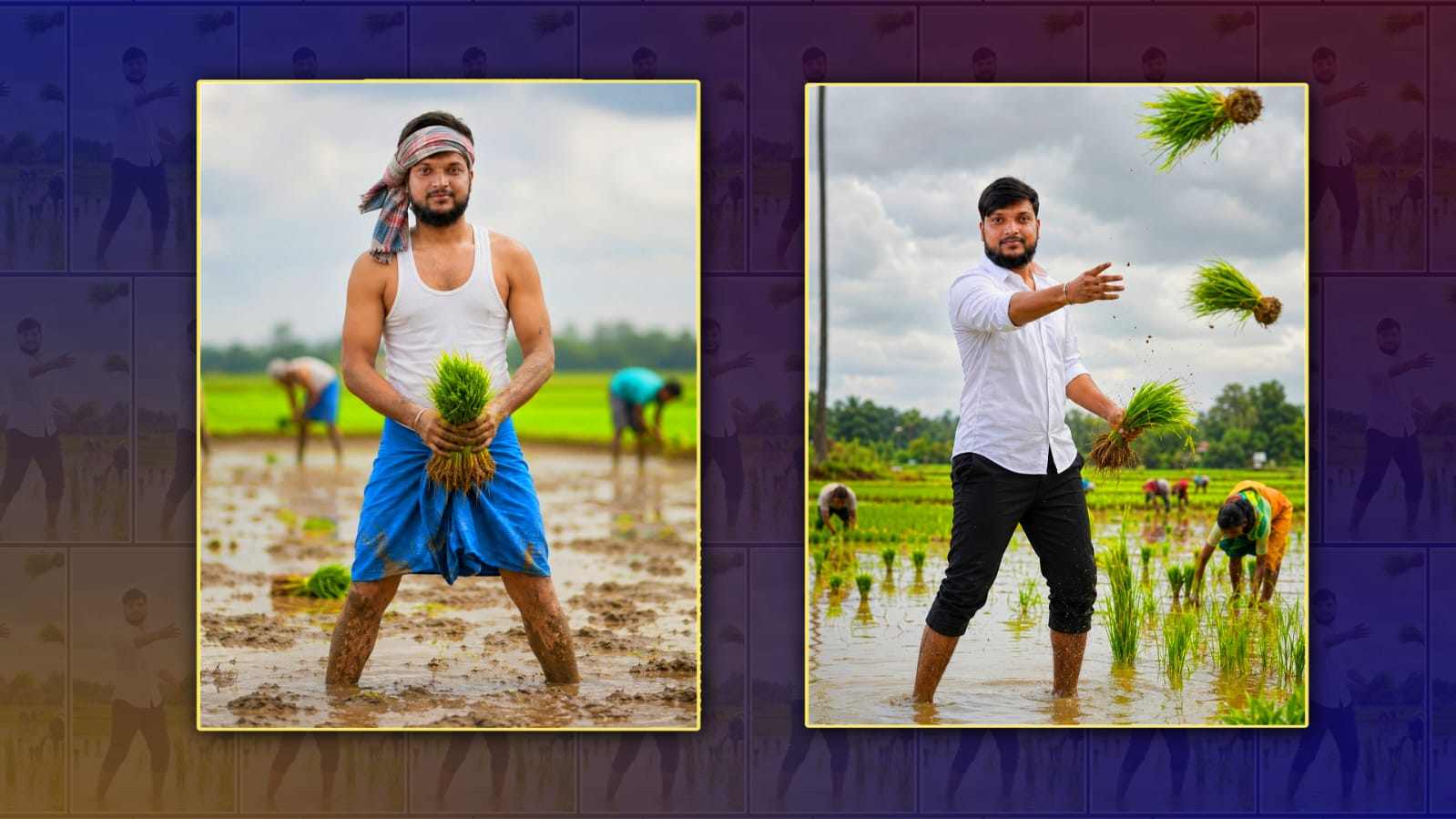
Use the uploaded reference image as the ONLY reference. Preserve the person's exact face, facial features, hairstyle, beard/mustache (if any), skin tone, body shape, clothing, colors, textures, accessories, and overall appearance with 100% identity accuracy. Do not change, redesign, or replace any part of the person. Create a highly realistic rural paddy field scene during the rice transplanting season. The same person is standing in the middle of a lush green, water-filled paddy field, energetically throwing bundles of young rice seedlings (paddy seedlings) into the field with one hand. Several bundles of rice seedlings are visible in the air, creating a dynamic action shot. Farmers are working in the background planting rice, with reflections visible in the shallow water. The expression should be natural and energetic, looking toward the direction of the throw. Bright daylight, cloudy monsoon sky, vibrant green landscape, cinematic composition, ultra-realistic photography, DSLR quality, HDR, sharp focus, natural colors, realistic water reflections, 8K, highly detailed. Keep the person's identity exactly the same as the uploaded reference image. Only the pose and action should change.
Prompt Style 2
Use the uploaded reference image as the ONLY reference. Preserve the person's exact face, facial features, hairstyle, beard/mustache (if any), skin tone, body shape, expression, identity, clothing details (only if suitable), and overall appearance with 100% identity accuracy. Do NOT change, redesign, beautify, replace, or generate a different face. The uploaded person's face must remain exactly the same. Create the same pose and composition as the reference: the person is standing knee-deep in a muddy paddy field during the rice transplanting season, smiling naturally at the camera. The person is wearing a traditional farmer's outfit consisting of a white sleeveless vest (banian), a blue lungi/dhoti folded above the knees, and a striped cotton towel tied around the head exactly like the reference. Both hands are holding a fresh bundle of green rice seedlings in front of the body. The legs are slightly apart in the muddy water. The background shows several farmers planting rice with a shallow depth of field, lush green fields, soft cloudy monsoon sky, realistic muddy water reflections, authentic Indian village atmosphere, DSLR photography, cinematic composition, HDR, ultra-realistic, natural skin texture, vibrant colors, sharp focus, 8K photorealistic. Match the framing, camera angle, body posture, smile, and overall visual style of the reference image. Change ONLY the person's identity to match the uploaded reference image while keeping everything else identical.
Girl Prompt
Use the uploaded reference image as the ONLY identity reference. Preserve the woman's exact face, facial features, hairstyle, skin tone, body shape, expression, clothing, saree, blouse, colors, fabric texture, jewelry, accessories, and overall appearance with 100% identity accuracy. Do NOT change, redesign, replace, beautify, or generate a different face or outfit. Keep everything exactly the same as the uploaded image. Recreate the same pose and composition as the farming reference. The woman is bending forward naturally while transplanting rice seedlings in a lush green paddy field. She is looking directly at the camera with a warm natural smile while planting rice with both hands close to the muddy water. Maintain the same body angle, posture, camera perspective, and cinematic framing as the reference. The dress, saree, blouse, hairstyle, jewelry, and accessories must remain exactly as in the uploaded photo. Do NOT replace them with farming clothes or a head covering. Create a realistic Indian rice field during the monsoon season with shallow muddy water, vibrant green rice plants, distant farmers working in the background, soft cloudy sky, natural daylight, realistic reflections, shallow depth of field, DSLR photography, cinematic composition, HDR, ultra-realistic, photorealistic, lifelike skin texture, vibrant colors, sharp focus, highly detailed, 8K quality. Only the pose, farming action, and environment should match the reference style. Everything about the woman's identity and clothing must remain exactly the same as the uploaded reference image.