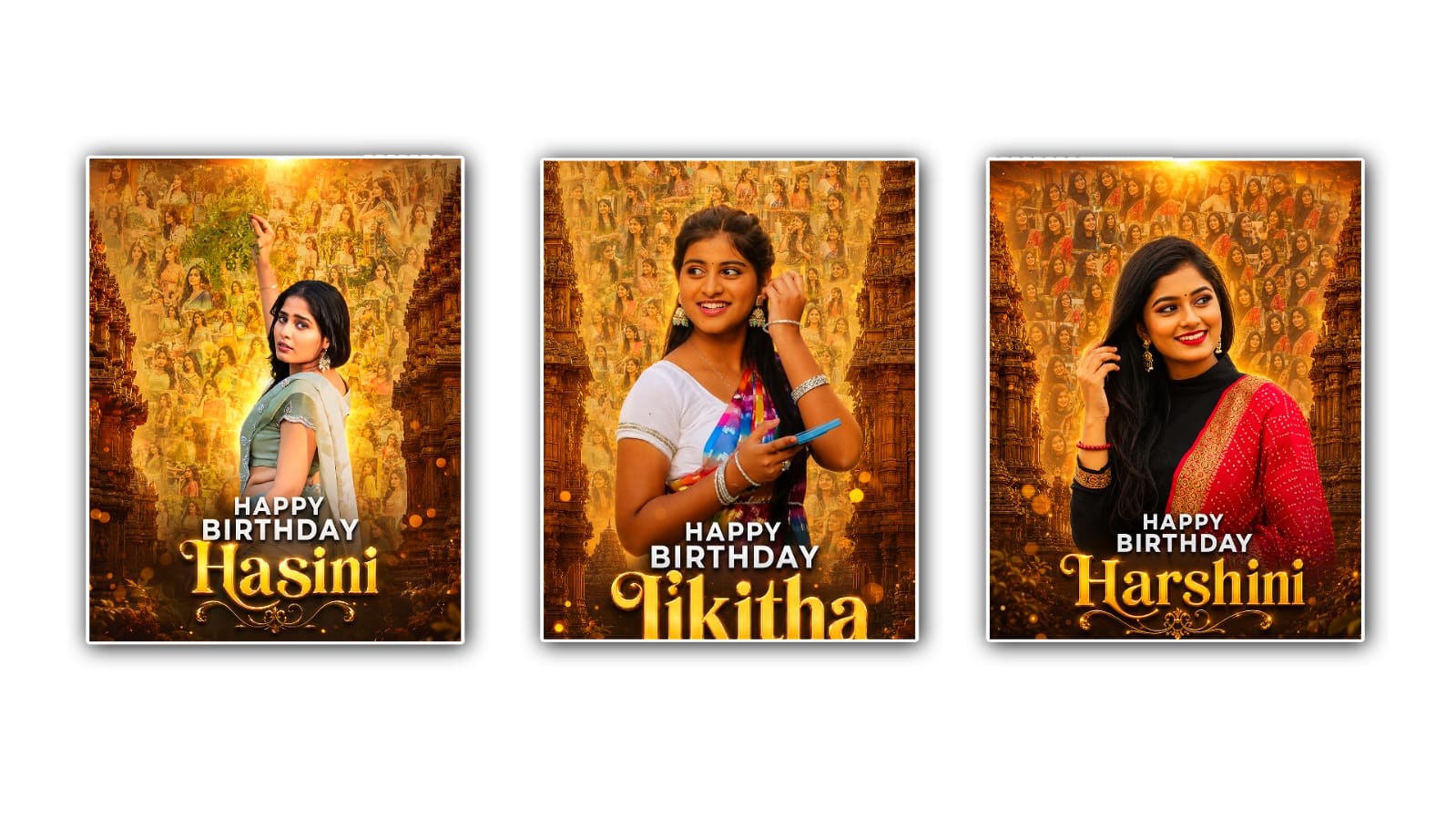
Creating a beautiful birthday poster has become much easier with the help of Google Gemini. You no longer need to be a professional graphic designer or spend hours learning complicated editing software. With the right prompt, a little creativity, and a few simple design ideas, you can create a stunning birthday poster that looks unique and professional. Whether you are designing a birthday poster for your friend, family member, child, colleague, or even for a client, Google Gemini can help you generate creative ideas, personalised messages, attractive colour combinations, and even detailed image prompts for AI image generators.
The first step in making the best birthday poster is deciding on the theme. Every birthday celebration has its own style. Some people prefer elegant and classy designs, while others love colourful, fun, or cartoon-themed posters. Before asking Gemini for help, think about the person’s age, favourite colours, hobbies, and interests. For example, a birthday poster for a child may include cartoon characters, balloons, confetti, and bright colours. A birthday poster for an adult may look more elegant with floral decorations, gold accents, or minimalistic designs.
Once you have a clear idea, open Google Gemini and start with a detailed prompt. Instead of writing a simple request like “Create a birthday poster,” provide more information. Mention the person’s name, age, favourite colours, preferred style, background elements, and the text you want to include. The more details you provide, the better the result will be. Gemini understands natural language very well, so you can describe your idea just as you would explain it to another person.
For example, you can ask Gemini to create a creative birthday poster idea featuring blue and gold colours, realistic balloons, a birthday cake, fireworks, and the text “Happy Birthday, Sarah! Wishing you endless happiness and success.” Gemini can generate an organised layout, suggest fonts, recommend decorative elements, and even provide prompts that work well with AI image generation tools.
One of the biggest advantages of using Google Gemini is its ability to generate personalised birthday wishes. Instead of using common phrases that everyone has seen before, Gemini can write emotional, funny, inspirational, or heartfelt birthday messages based on your request. This makes your poster feel more personal and meaningful. A thoughtful birthday message often leaves a stronger impression than an ordinary design.
Choosing the right colours is another important part of creating an attractive birthday poster. Colours create emotions and influence the overall appearance of the design. Bright colours such as yellow, pink, orange, and sky blue create a cheerful feeling, while black, gold, navy blue, and white give a luxurious appearance. Gemini can recommend colour palettes that match your chosen theme and help maintain visual balance throughout the poster.
Typography also plays a significant role in making your birthday poster stand out. The title should be large, bold, and easy to read. Decorative fonts can be used for the birthday greeting, while simpler fonts are better for additional information. Gemini can suggest font combinations that complement each other without making the design look crowded or difficult to read.
Images are often the centrepiece of a birthday poster. If you are using AI image generation tools, Gemini can create detailed prompts describing realistic birthday scenes, elegant decorations, balloons, flowers, gifts, cakes, candles, or custom backgrounds. These prompts help produce high-quality visuals that match your creative vision. If you already have a photograph of the birthday person, Gemini can also suggest creative ways to place it within the design, such as inside a golden frame, surrounded by flowers, or blended into a festive background.
A well-designed birthday poster should not contain too much text. Keep the main message clear and easy to read. The person’s name should be the most noticeable element after the “Happy Birthday” greeting. If needed, include the birthday date or a short quote, but avoid filling every space with text. White space makes the design look clean and professional.
Balance is another essential design principle. Every element should have enough room without overlapping. Decorative items like balloons, confetti, ribbons, stars, or flowers should enhance the poster instead of distracting from the main message. Gemini can suggest layout ideas that keep the design visually balanced while maintaining an attractive appearance.
If you plan to share your birthday poster on social media platforms such as Instagram, Facebook, or WhatsApp, consider the image size before designing it. Square posters work well for Instagram posts, while portrait formats are suitable for WhatsApp status updates and stories. Landscape designs may be better for Facebook covers or printed banners. Gemini can recommend the appropriate dimensions based on where you intend to use the poster.
Another useful feature is creating posters for different age groups. A child’s birthday poster may include animated animals, colourful toys, and playful fonts. A teenager’s poster could feature modern graphics, gaming themes, music, or sports. For adults, elegant floral backgrounds, luxury colours, or minimalist styles often create a sophisticated appearance. Gemini can easily adjust its suggestions according to the recipient’s personality and age.
Many people also like adding motivational or emotional quotes to birthday posters. Instead of using generic quotes found everywhere online, Gemini can generate original birthday messages that sound natural and heartfelt. This makes the poster more memorable and shows that extra thought was put into creating it.
If you are designing birthday posters for clients or running a small design business, Google Gemini can save a significant amount of time. Rather than starting every project from scratch, you can ask Gemini for fresh concepts, unique layouts, catchy birthday wishes, and creative prompts for different themes. This allows you to produce high-quality posters more efficiently while maintaining originality.
Before finalising your birthday poster, carefully review every detail. Double-check the spelling of the person’s name, verify the birthday date, and ensure that all text is correctly aligned. Small mistakes can reduce the overall quality of an otherwise beautiful design. It is also helpful to view the poster on different devices to make sure the colours and text remain clear and visually appealing.
In the end, creating the best birthday poster with Google Gemini is not just about using artificial intelligence. It is about combining your creativity with Gemini’s ability to generate ideas, personalised content, and design inspiration. When you provide clear instructions and thoughtful details, Gemini becomes a powerful creative assistant that helps transform your imagination into a beautiful birthday poster. Whether you are creating a simple greeting for a loved one or designing professional posters for customers, Google Gemini makes the entire process faster, easier, and more enjoyable while allowing your personal creativity to shine through every design.
Prompt
4:5 Ultra-Realistic Premium Birthday Mosaic Poster Prompt (Same Style) Ultra-realistic premium birthday poster, vertical 4:5 ratio (1080×1350), 8K UHD, DSLR-quality, HDR cinematic color grading, ultra-sharp premium print quality. Use the uploaded portrait exactly as it is with absolutely no changes to the facial features, hairstyle, skin tone, expression, smile, earrings, bindi, pose, body proportions, or identity. Main Composition Create a luxurious birthday poster where the main portrait is the hero element. Place the uploaded portrait large in the center, occupying around 65–70% of the poster height. The portrait should pop out naturally with a premium Photoshop-quality cutout. Behind the main portrait, create a beautiful mosaic collage made from 50–80 small photographs of the same girl. These photos should NOT appear inside separate square frames or visible borders. Instead, blend them together naturally like a photo mosaic wall, with different sizes and slight rotations, overlapping softly to create a premium artistic background. The mosaic should fade smoothly toward the edges using a soft feather mask, making the center brighter and drawing attention to the main portrait. Background Luxury Indian temple architecture on both left and right sides. Historic sandstone temple carvings. Warm golden sunset sky. Soft glowing sunlight from the top. Golden mist. Luxury cinematic atmosphere. Orange–gold ambient lighting. Center Glow Behind the main portrait create a soft circular golden halo with warm light rays. Apply subtle vignette around the edges. Soft shadow around the subject to separate it from the mosaic. The portrait should appear three-dimensional and premium. Typography Center-bottom: HAPPY BIRTHDAY Bold Sans Serif Font White Soft black shadow Premium luxury spacing Below it: "Harshini" Large Elegant Serif Font Luxury Gold & Cream Gradient 3D Emboss Effect Soft Golden Glow Premium Photoshop Typography Lighting Golden Rim Light HDR Lighting Volumetric Sun Rays Warm Glow Studio Portrait Lighting Realistic Highlights Effects Photo Mosaic Background Soft Feather Blend Golden Bokeh Light Leaks Dust Particles Luxury Glow Atmospheric Haze Premium Color Grading Ultra-realistic Skin Texture Realistic Shadows Professional Photoshop Finish Color Palette Golden, Amber, Orange, Cream, Brown, Warm Yellow, Soft Black. Quality Photorealistic, Hyper-realistic, Ultra Detailed, Luxury Birthday Banner, Premium Photoshop Quality, 8K UHD, HDR, Ultra Sharp Focus, Large Center Portrait, Borderless Photo Mosaic Background, Soft Golden Halo, Cinematic Temple Background, Instagram Reel Poster, 4:5 Vertical Ratio.