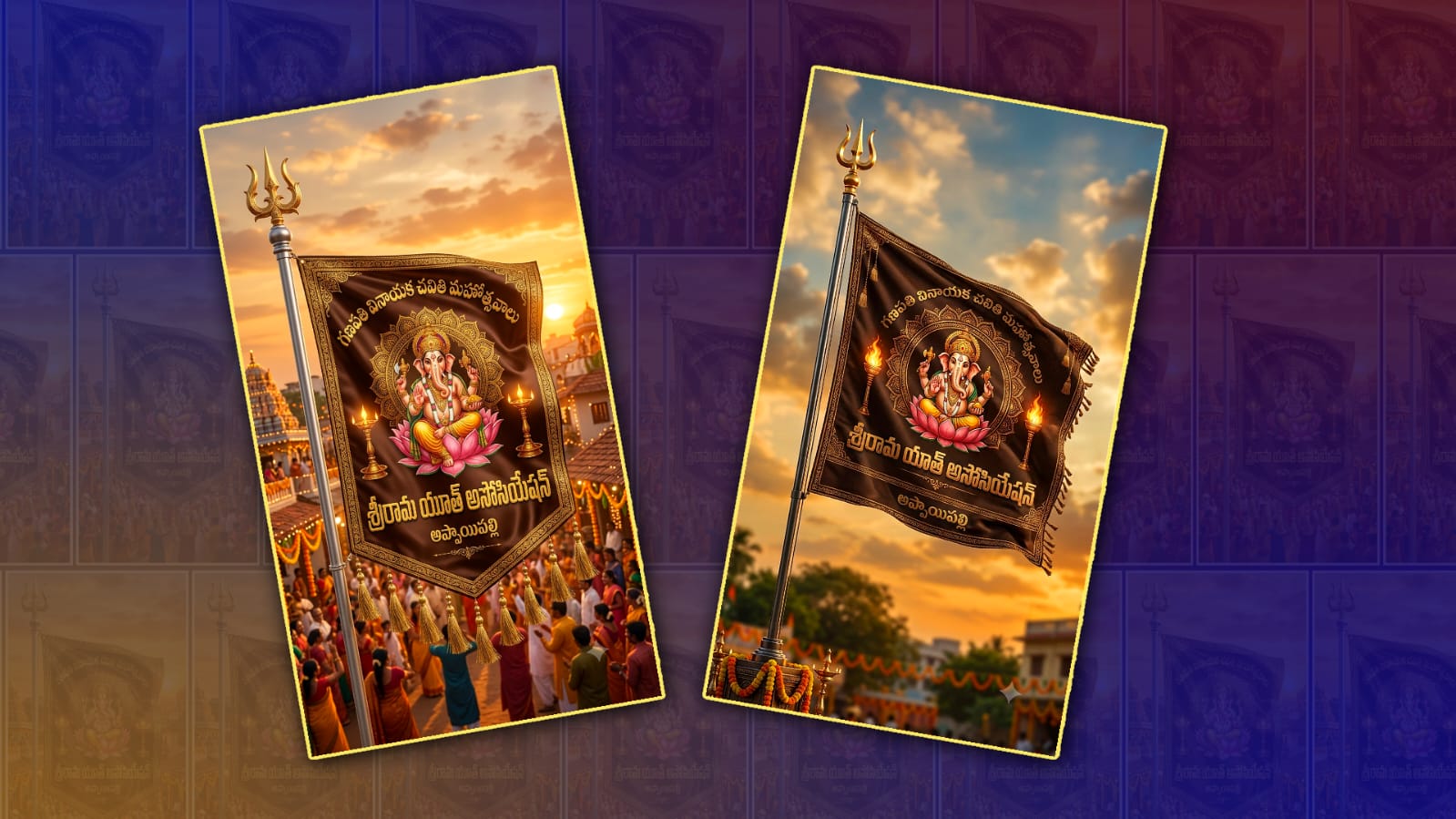
Creating AI-powered videos has become one of the biggest social media trends in 2026. One of the most viral styles is the Ganesh Youth Flag Animation Video, where Lord Ganesha is shown with a group of energetic youth holding saffron flags, cinematic lighting, and dramatic background music. The good news is that you no longer need professional editing skills. With Gemini AI, you can generate powerful prompts, creative ideas, and even plan your entire video in minutes. In this guide, you’ll learn how to create a trending Ganesh youth flag animation video from start to finish.
What is a Ganesh Youth Flag Animation Video?
A Ganesh youth flag animation video is a short cinematic clip featuring:
- Lord Ganesha in a majestic style
- Young devotees carrying saffron flags
- Slow-motion walking scenes
- Temple or festival backgrounds
- Smoke, lighting, and cinematic camera movements
- Devotional or trending background music
These videos are widely shared on YouTube Shorts, Instagram Reels, and Facebook because they combine devotion with modern AI animation.
Why Use Gemini AI?
Google’s Gemini AI helps creators generate high-quality prompts, story ideas, scene descriptions, and creative concepts for AI video generation. Instead of spending hours manually writing prompts, Gemini can produce detailed, cinematic prompts within seconds.
You can try Gemini here:
Gemini AI:
Google Gemini
Step 1: Open Gemini AI
Visit the Gemini website and sign in with your Google account.
After opening Gemini, tell it exactly what you want.
Example:
Create a cinematic AI video prompt of Lord Ganesha walking with 50 young devotees carrying saffron flags during sunset with dramatic lighting, flying dust, slow-motion camera movement, realistic expressions, ultra HD, 4K, devotional atmosphere.
Gemini will generate a professional prompt that works well with many AI image and video tools.
Step 2: Improve the Prompt
Ask Gemini to make the prompt more cinematic.
For example:
Rewrite this prompt in ultra-realistic cinematic style with detailed camera angles, volumetric lighting, realistic crowd movement, 4K quality, and festival atmosphere.
The more detailed the prompt, the better your final animation usually looks.
Step 3: Generate Images
Once your prompt is ready, use your preferred AI image generator to create several images.
Generate images such as:
- Lord Ganesha standing
- Ganesh walking
- Youth carrying saffron flags
- Temple entrance
- Festival crowd
- Sunset background
- Flying flower petals
- Smoke and lighting effects
Create multiple images so your animation looks more dynamic.
Step 4: Convert Images into Animation
Use an AI video generator to animate your images.
Ask the AI to create effects such as:
- Slow walking
- Flag waving
- Camera zoom
- Flying dust
- Cinematic lighting
- Wind effects
- Crowd movement
Keep each clip between 5 and 8 seconds for smooth editing.
Step 5: Add Background Music
Choose devotional background music that matches the mood.
Popular choices include:
- Ganesh devotional beats
- Festival dhol music
- Cinematic devotional background score
- Traditional Indian percussion
Always make sure you have permission to use any music in your videos.
Step 6: Edit the Final Video
Import all generated clips into your favourite video editor.
Arrange them in this order:
- Temple introduction
- Lord Ganesha close-up
- Youth entering with flags
- Slow-motion walking
- Flying flower petals
- Flag waving
- Final cinematic close-up of Lord Ganesha
Add smooth transitions, colour grading, glow effects, and slow-motion where appropriate.
Best Gemini Prompt Example
You can copy this prompt into Gemini:
Create an ultra-realistic cinematic AI video prompt featuring Lord Ganesha walking majestically through a grand temple entrance with 100 energetic young devotees carrying saffron flags. Golden sunset lighting, volumetric rays, flying flower petals, realistic smoke, dramatic slow-motion camera movement, emotional devotional atmosphere, ultra HD 4K, highly detailed faces, cinematic composition, realistic shadows, vibrant saffron colors, festival celebration, professional movie quality.
Gemini can also expand this into multiple scene prompts for longer videos.
Tips for Viral Videos
To improve your chances of reaching more viewers:
- Use vertical 9:16 format.
- Keep videos under 30 seconds.
- Start with a strong first three seconds.
- Add cinematic lighting.
- Use emotional devotional music.
- Include smooth camera movements.
- Upload in 1080p or 4K.
- Use an attractive thumbnail.
Suggested YouTube Title
Trending Ganesh Youth Flag Animation Video Using Gemini AI | Step-by-Step AI Tutorial (2026)
SEO-Friendly Keywords
- Ganesh AI video
- Gemini AI video tutorial
- Ganesh animation
- AI devotional video
- Ganesh youth flag video
- AI festival animation
- Google Gemini prompts
- AI cinematic video
- Ganesh AI reels
- AI Shorts tutorial
Conclusion
Creating a trending Ganesh youth flag animation video is now easier than ever with Gemini AI. Instead of struggling to write detailed prompts, you can let Gemini generate professional cinematic descriptions in seconds. Combine those prompts with an AI image generator, animate the scenes using an AI video tool, and finish everything in a video editor with devotional music and cinematic effects. As AI tools continue to improve, content creators can produce high-quality devotional videos with minimal effort while focusing more on creativity and storytelling. Experiment with different prompts, lighting styles, and camera angles to develop your own unique visual style and create engaging videos for YouTube Shorts, Instagram Reels, and other social platforms.
Image Prompt
Create a premium ultra-realistic Hindu festival flag based on the reference image. Dark brown luxury silk flag with golden embroidered border, realistic fabric folds, golden tassels, silver flagpole with golden Trishul. Center a detailed Lord Ganesha sitting on a pink lotus inside a golden mandala, with two glowing brass lamps on both sides. At the top write “గణపతి వినాయక చవితి మహోత్సవాలు” in elegant curved golden Telugu font. Below Ganesha write “YOUTH NAME” in large royal gold Telugu letters, and below it write “VILLAGE NAME” in a smaller matching gold Telugu font. Cinematic sunset sky, decorated village background, warm golden lighting, HDR, 8K, ultra-detailed, realistic, premium festival banner, no watermark, vertical 9:16.
Negative Prompt: Low quality, blurry, watermark, extra text, spelling mistakes, distorted Ganesha, dull colors, cropped flag, low resolution.Video Prompt
“Flag gently waving in the wind with a smooth cinematic slow zoom out, ultra-realistic, 9:16.”