If you want to create a beautiful and memorable Independence Day photo using Google Gemini, you do not need to be a professional photo editor or spend hours learning complicated editing apps. With a simple photo, a clear idea, and the right prompt, you can create an attractive Independence Day image that looks festive, creative, and perfect for sharing on social media. Google Gemini can help you turn an ordinary photograph into a patriotic-themed picture by adding suitable colours, backgrounds, lighting, text, and other visual elements.
The first thing you need is a good-quality photo that you want to edit. You can choose your own portrait, a family photo, a picture with friends, or even a simple selfie. A clear photo with good lighting usually gives better results because Gemini can understand the person’s face, clothes, and overall appearance more easily. Try to select a photo where your face is clearly visible, and there are not too many distracting objects in the background.
Open Google Gemini on your phone or computer and sign in with your Google account if required. Look for the option that allows you to upload or add an image. Select the photo from your device and upload it to Gemini. After uploading the picture, you need to tell Gemini exactly what kind of Independence Day photo you want. The more clearly you describe your idea, the easier it is for the AI to create an image that matches your expectations.
For an Indian Independence Day theme, you can ask Gemini to create a stylish patriotic background using the colours saffron, white, and green. You can also ask it to include the Ashoka Chakra, Indian flags, flowers, soft glowing lights, or a beautiful sky in the background. If you are editing a portrait, you can specifically tell Gemini not to change your face or identity. This is useful when you want the final image to still look like you rather than like a completely different person.
For example, you can use a prompt such as: “Create a beautiful Indian Independence Day-themed photo using this image. Keep my face, facial features, hairstyle, and identity natural and unchanged. Add an elegant Indian flag-inspired background with saffron, white, and green colours, a subtle Ashoka Chakra, soft patriotic lighting, and a realistic cinematic look. Make the photo high quality, bright, attractive, and suitable for sharing on social media.”
You can make the prompt more personal depending on the type of photo you have. If you are wearing traditional Indian clothes, you can ask Gemini to create a traditional patriotic atmosphere. If you are wearing a formal outfit, you can request a modern and elegant Independence Day design. You can also ask for a realistic outdoor setting with the Indian flag in the background, a sunrise effect, or gentle tricolour lighting around the subject.
One important thing is to avoid giving Gemini a very short prompt such as “Make this an Independence Day photo.” Although Gemini may understand the basic idea, the result may not look exactly the way you imagined. Instead, describe the colours, background, mood, lighting, clothing, text, and overall style you want. You can also mention whether you want the image to look realistic, cinematic, traditional, modern, professional, or festive.
If you want to add Independence Day wishes to the image, you can include that in your prompt. For example, you could say, “Add elegant text saying Happy Independence Day in a clean, readable style.” You can also request “15 August” or “Jai Hind” if you want those words included. However, AI-generated text in images can sometimes contain spelling or layout mistakes, so always check the final image carefully. If the text is incorrect, simply ask Gemini to correct it or generate the image again.
You can also ask Gemini to create a more dramatic photo by adding cinematic lighting. A prompt like “Add soft golden sunlight, subtle multicolour lighting, a realistic Indian flag waving in the background, and a premium cinematic photography style” can produce a more polished appearance. If you prefer something simple, ask for a clean white background with small saffron and green elements and a subtle Ashoka Chakra.
Another popular idea is to create a social-media-style Independence Day poster from your photograph. You can ask Gemini to place your photo in the centre and create a patriotic background around it. You might request a combination of the Indian flag, Ashoka Chakra, glowing particles, flowers, and soft light effects. Make sure you tell Gemini to keep the design balanced and avoid adding too many elements, because a crowded background can make the photo look less professional.
If the first result is not perfect, there is no need to start again from the beginning. One of the useful things about using an AI tool is that you can continue giving instructions. You can say, “Make the background more realistic,” “Reduce the brightness,” “Keep my face exactly like the original,” “Make the tricolour colours more subtle,” or “Create a more professional Instagram-style design.” Gemini can use your follow-up instructions to refine the result.
You can also experiment with different styles. For a natural photograph, ask for realistic photography. For a poster, ask for a professional graphic-design style. For a traditional appearance, request Indian cultural elements and warm colours. For a modern look, use a minimalist background with subtle colour effects. Trying a few different prompts can help you discover which style looks best with your original photograph.
Before sharing the final image, take a moment to check the details. Look at your face, hands, clothes, the Indian flag, the Ashoka Chakra, and any text added to the image. Sometimes AI image editing can accidentally change small details, so it is worth checking the final result carefully. If something looks strange, tell Gemini what needs to be corrected and generate another version.
Once you are happy with the result, you can save the image to your device and share it with your friends and family. It can be used as a WhatsApp status, Instagram post, Facebook post, profile picture, or simply as a personal Independence Day greeting. You can also create different versions for family members by using their photographs and changing the prompts according to their preferences.
The best part about making an Independence Day photo in Google Gemini is that you can be creative without needing advanced editing skills. A clear photograph and a detailed prompt are often enough to get started. Instead of copying someone else’s design, try creating something that represents your own personality. Keep the Indiacolour colours tasteful, use a clean composition, and choose a style that makes the original photograph look natural.
So, this Independence Day, you can turn a simple photograph into a special patriotic memory with Google Gemini. Whether you want a realistic portrait, a stylish poster, a traditional Indian design, or a simple greeting image, the key is to explain your idea clearly in the prompt. Experiment with different backgrounds, lighting, colours, and designs until you find the look you like. With a little creativity and a few simple instructions, you can create a beautiful Happy Independence Day photo that is ready to share with everyone.
INDEPENDENCE DAY PROMPTS
KIDS PROMPT
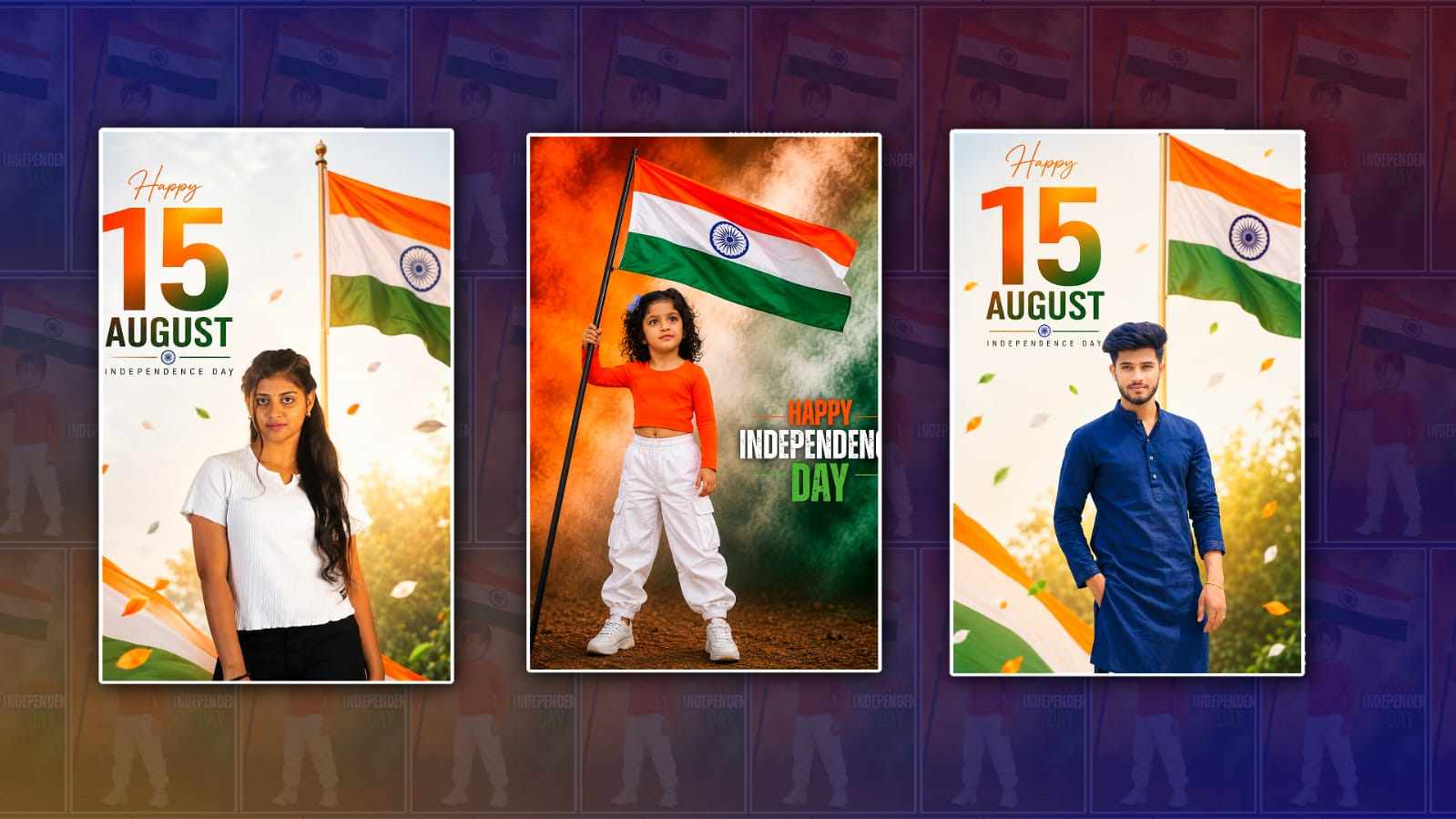
Use the uploaded photo as the EXACT person and identity reference. Preserve the person’s exact face, facial features, hairstyle, hair length, skin tone, body proportions and natural appearance. Do NOT modify, replace, beautify or regenerate the face or hairstyle. Transform the person into the SAME pose, composition and cinematic style as the second reference image. The outfit MUST be the same as the second reference: bright saffron-orange full-sleeve fitted top, white loose cargo pants and white sneakers. Do not change the outfit design or colours. The person is confidently standing and holding a large Indian national flag with one hand. Dramatic orange, white and green patriotic smoke fills the background, cinematic Independence Day atmosphere, realistic ground, powerful pose, dramatic lighting, natural shadows, ultra-realistic skin and clothing texture, sharp facial details.

Text: “HAPPY INDEPENDENCE DAY” in premium cinematic typography. Vertical 4:5 portrait, photorealistic, 8K quality.

IMPORTANT: This prompt must work for ANY uploaded person photo. Keep the uploaded person’s EXACT face, hairstyle and identity unchanged, regardless of whether the uploaded photo is male or female. Use the uploaded photo as the EXACT person and identity reference. Preserve the person’s exact face, facial features, hairstyle, hair length, skin tone, body proportions and natural appearance. Do NOT modify, replace, beautify or regenerate the face or hairstyle. Transform the person into the SAME pose, composition and cinematic style as the second reference image. The outfit MUST be the same as the second reference: bright saffron-orange full-sleeve fitted top, white loose cargo pants and white sneakers. Do not change the outfit design or colours. The person is confidently standing and holding a large Indian national flag with one hand. Dramatic orange, white and green patriotic smoke fills the background; cinematic Independence Day atmosphere; realistic ground; powerful pose; dramatic lighting; natural shadows; ultra-realistic skin and clothing texture; sharp facial details.

Text: “HAPPY INDEPENDENCE DAY” in premium cinematic typography.

Vertical 4:5 portrait, photorealistic, 8K quality.

IMPORTANT: This prompt must work for ANY uploaded person photo. Keep the uploaded person’s EXACT face, hairstyle and identity unchanged, regardless of whether the uploaded photo is male or female.
BOY OR GIRL PROMPT
Use the uploaded photo as the EXACT person reference. Preserve the exact face, facial identity, hairstyle, hair length, skin tone, body proportions, original clothing and clothing colour. Do NOT change, replace or beautify the person. Use ONLY the FIRST REFERENCE IMAGE for the design style: bright,t elegant background, large Indian national flag on the right, soft golden sunlight, subtle multicolour elements, floating petals, cinematic lighting, clean,ean premium composition and realistic photography. Keep the uploaded person’s original dress exactly unchanged. Do NOT copy the reference person’s face, hairstyle or clothing.

Add elegant text:
“Happy”
“15”
“AUGUST”
“INDEPENDENCE DAY”

Photorealistic, ultra-realistic, natural skin and hair texture, sharp details, 8K, vertical 4:5.

IMPORTANT: Works for BOTH BOY and GIRL. Face, hairstyle and dress must remain exactly as uploaded.