Creating a 3D wedding anniversary video has become one of the most popular ways to celebrate a special relationship. Instead of making a simple slideshow, many couples now prefer cinematic videos with realistic effects, romantic animations, and personalised messages. Thanks to Google Gemini, generating creative ideas, writing emotional scripts, and designing prompts for AI video tools has become much easier. While Google Gemini does not directly create complete 3D videos on its own, it can help you generate everything you need to produce a stunning anniversary video using AI-powered video generators.
The first step is deciding what kind of anniversary video you want to make. Think about the mood you want to create. Some couples prefer a romantic love story, while others want a luxurious cinematic animation with flowers, candles, and golden decorations. You can also create a modern 3D scene where the couple stands together in a beautifully designed environment with their names, anniversary date, and a heartfelt message. Having a clear idea before using Gemini helps you get better results.
Open Google Gemini and start by describing your vision in detail. Instead of giving a short command, explain exactly what you want. For example, you can ask Gemini to create a detailed AI prompt for a realistic 3D wedding anniversary video featuring a smiling couple, elegant roses, glowing lights, floating hearts, and a golden “Happy Wedding Anniversary” title. The more descriptive your request is, the better the generated prompt will be.
Gemini is especially useful because it understands natural language very well. If the first prompt doesn’t match your expectations, simply ask it to improve the description. You can request changes such as making the lighting warmer, adding fireworks in the background, using a luxury palace theme, including realistic facial expressions, or creating a dreamy sunset atmosphere. This allows you to refine your concept until it perfectly matches your imagination.
Once you receive the prompt from Gemini, you can use it with an AI video generation platform that supports text-to-video creation. Paste the generated prompt into the video generator and customise any available settings such as video duration, camera movement, animation quality, and aspect ratio. Most creators choose a portrait format for Instagram Reels and YouTube Shorts, while landscape works better for YouTube videos or television displays.
Adding personalised details makes the video much more meaningful. Ask Gemini to write a romantic anniversary message using your names and the number of years you have been together. For example, instead of a generic greeting, you can include a touching message about your journey, memorable moments, and hopes for the future. A personalised script creates a stronger emotional connection than a simple “Happy Anniversary” message.
You can also ask Gemini to generate scene-by-scene ideas. For instance, the opening scene may feature two golden rings rotating in the air with sparkling effects. The second scene could reveal a beautiful garden filled with blooming roses and butterflies. The third scene might show the couple walking together under glowing lights while soft music plays in the background. The final scene can display the anniversary message along with the couple’s names and date surrounded by floating hearts and fireworks.
If you want a more realistic appearance, tell Gemini to create prompts using cinematic lighting, ultra-HD quality, realistic skin textures, smooth camera movements, and professional depth-of-field effects. These details significantly improve the final output when used with advanced AI video generation tools.
Background music is another important element. While Gemini cannot generate copyrighted songs, it can recommend music styles that fit the mood of your anniversary video. Soft piano melodies, romantic violin performances, gentle acoustic guitar, or orchestral love themes are all excellent choices. Matching the visuals with emotional music creates a memorable viewing experience.
Voice narration can make the video even more special. Ask Gemini to write a heartfelt anniversary speech that sounds natural and emotional. You can record the narration yourself or use an AI voice generator to produce professional-quality audio. A sincere voice expressing gratitude, love, and future dreams adds warmth that visual effects alone cannot achieve.
Choosing the right colours also enhances the video’s appeal. Romantic themes often use gold, white, red, pink, and warm lighting because thesecolours symbolisee love, celebration, and elegance. Gemini can suggest suitable colour palettes based on your preferred style, whether you want a royal luxury theme, a modern minimalist design, or a magical fantasy atmosphere.
Don’t overcrowd the video with too many effects. While AI generators can produce spectacular animations, a balanced design often looks more professional. Smooth transitions, subtle sparkles, elegant camera movements, and carefully timed text animations usually create a better viewing experience than excessive visual effects. Gemini can also suggest pacing for each scene so the story flows naturally from beginning to end.
Including memorable photographs is another wonderful idea. If your chosen video editor supports image integration, you can combine your favourite wedding and anniversary photos with AI-generated 3D scenes. Gemini can help you decide where each photo should appear and even generate captions that complement every memory. This transforms a standard slideshow into a cinematic storytelling experience.
Before exporting the final video, preview it several times. Check for spelling mistakes, timing issues, image quality, and synchronisation. Even small corrections can greatly improve the overall presentation. If you notice anything that feels awkward, return to Gemini and ask for revised text, improved dialogue, or alternative scene descriptions.
After completing the video, export it in high resolution such as Full HD or 4K if available. Higher-quality videos look much better when shared on social media or displayed on large screens during anniversary celebrations. Save multiple copies to cloud storage or an external drive to preserve your special memories.
One of the biggest advantages of using Google Gemini is its ability to simplify the creative process. Instead of spending hours trying to write scripts, think of ideas, or describe visual scenes, you can rely on Gemini to generate professional prompts, emotional messages, creative concepts, and storytelling suggestions within minutes. This saves time while allowing you to focus on personalising the final result.
Whether you are making a surprise gift for your spouse, creating a memorable social media post, or preparing a video to play during an anniversary celebration, combining Google Gemini with AI video generation tools can help you produce a beautiful 3D wedding anniversary video. With thoughtful prompts, meaningful storytelling, elegant visuals, and heartfelt words, you can create a lasting digital memory that celebrates your journey together and makes your special day even more unforgettable.
IMAGE PROMPT
Vertical 9:16. Use the uploaded image ONLY as the identity reference for the people.

CRITICAL FACE LOCK

Preserve ONLY the following from the uploaded image:

 Exact face, Exact hairstyle, Hair color, Skin tone, Facial features, Body proportions, Expression, Clothing, Dress colors, Accessories, Glasses, Watches, Jewelry, Do, NOT change any of these. Everything else must follow the reference style below.

REFERENCE SCENE STYLE (FIXED FOR EVERY IMAGE)

Always recreate the subjects inside the exact same premium outdoor portrait environment:

Decorative vintage green iron bridge with elegant floral patterns. Beautiful lush green park. Dense natural trees. Soft blurred green bokeh background. Rich natural greenery. Warm cinematic evening light. DSLR portrait photography. 85mm lens. f/1.8 shallow depth of field. Soft natural skin tones. Premium engagement photoshoot style. Romantic candid pose. Natural smiling expressions. Luxury outdoor portrait composition. Realistic shadows.
High-end color grading. Ultra realistic. HDR. 8K. Photorealistic.

COMPOSITION

Keep the couple standing naturally beside the decorative bridge exactly in this photography style. Maintain the same camera angle. Maintain the same portrait framing. Maintain the same bridge position. Maintain the same park environment. Maintain the same lighting. Maintain the same depth of field. Maintain the same luxury outdoor portrait aesthetic.

OUTPUT

The uploaded image should only provide the people's identity, hairstyle, clothing and colors. Everything else including the bridge, park, background, composition, camera angle, lighting, depth of field and overall photography style must always match this reference style exactly.
SCENE 1 PROMPT
Use the uploaded image as the ONLY reference.

Identity Lock:
Keep both faces exactly identical. Do not change hairstyle, skin tone, facial features, expressions, clothing, jewelry, glasses, watches, saree, shirt, or body proportions.

Duration: 5 seconds
Aspect Ratio: 9:16

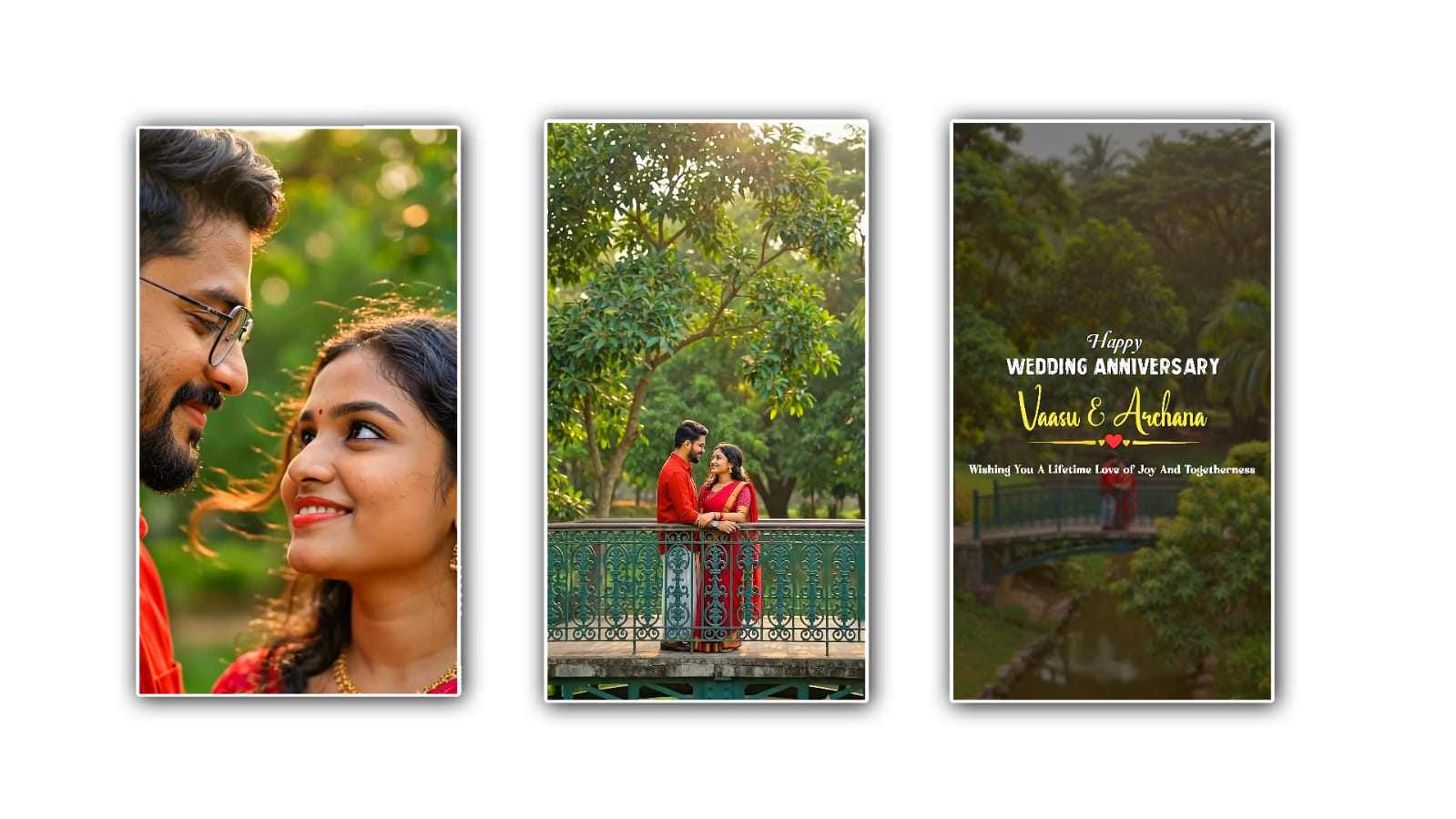
The video begins with an extreme close-up of the couple smiling lovingly into each other's eyes. Soft breeze gently moves the woman's hair and saree pallu. The background trees sway naturally. The camera slowly pulls backward in a smooth cinematic motion while maintaining perfect focus on the couple. Warm golden evening sunlight creates beautiful rim lighting and realistic shadows.

Ultra realistic DSLR quality.
Natural cinematic movement.
No sudden camera motion.
No text.
No logo.
No watermark.
SCENE 2 PROMPT
Continue seamlessly from the previous scene.

Keep the same couple.
Same faces.
Same clothes.
Same pose progression.
Same lighting.
Same environment.

Duration: 5 seconds
Aspect Ratio: 9:16

The camera continues pulling backwards while slowly rising upward like a professional drone. More of the decorative bridge becomes visible. Lush green trees surround the couple. Soft cinematic sunlight filters through the leaves. The couple continues smiling naturally without changing pose. Smooth drone movement only.Ultra-realistic.

No identity change.
No text.
No logo.
No watermark.
SCENE 3 PROMPT
Continue seamlessly from the previous scene.

Keep the same couple.
Same environment.
Same bridge.
Same lighting.
Same camera direction.

Duration: 5 seconds
Aspect Ratio: 9:16

The drone continues flying backward and slightly higher, revealing the entire beautiful park around the bridge. At the final two seconds, elegant golden glowing typography slowly fades into the center of the screen.

Text:

Happy Wedding Anniversary

❤️
[NAME]
&
[NAME]
❤️

Wishing You A Lifetime Of Love,
Joy And Togetherness.

Golden particles gently float around the text.
Soft lens flare.
Luxury cinematic ending.

Ultra realistic.
Premium wedding film.
No identity changes.