If you are searching for how to make 3d logos with your name in Google Gemini, you are probably looking for a simple way to create eye-catching logo designs without learning professional graphic design software. Google Gemini has become a powerful AI tool that can help generate creative ideas, write detailed image prompts, and assist with designing unique 3D logo concepts. Whether you want a stylish logo for your social media profile, YouTube channel, gaming account, or personal brand, Gemini can make the process much easier when you know how to use it effectively.
The first thing to understand is that Google Gemini works best when you provide clear and detailed instructions. Instead of typing a short request like “make a 3D logo,” describe exactly what you want. Mention the name you want to appear in the logo, the style, colours, lighting effects, background, and overall mood. For example, if the youth name is “Alex,” you can ask Gemini to create a prompt for a modern 3D logo featuring the name Alex with glowing blue lighting, metallic textures, realistic shadows, and a dark futuristic background. The more details you include, the better the results will usually be.
Many people use the word “youth name” to describe a trendy or stylish name design that looks modern and attractive. If you want your logo to have a youthful appearance, you can ask Gemini to use vibrant colours, glossy effects, bold typography, and creative 3D elements. Popular colour combinations include blue and black, gold and white, red and silver, or purple with neon lighting. These combinations often make logos look energetic and visually appealing.
Another important step is choosing the right font style. Even though Gemini may not generate the final image directly in every situation, it can suggest font styles that match your design. Bold fonts with thick edges often look better in 3D because they create more depth and make lighting effects stand out. You can also request futuristic, gaming, luxury, minimalist, or graffiti-inspired fonts depending on the look you want.
When writing your prompt, include details about lighting because lighting plays a huge role in making a logo appear three-dimensional. You can ask for soft reflections, dramatic shadows, glowing neon edges, cinematic lighting, or realistic highlights. These small details help create a premium-looking logo that feels professional instead of flat. If you are creating a logo for social media, adding subtle lighting around the letters can make the design more noticeable.
Textures are another feature that can improve your logo. Gemini can help you write prompts describing metallic, chrome, glass, crystal, carbon fibre, wooden, marble, or glossy textures. Each material creates a different visual effect. A chrome texture with blue neon lighting gives a futuristic look, while a gold metallic texture creates a luxurious appearance. Choosing the right texture depends on the purpose of your logo and your personal preference.
Background selection is equally important. A clean background allows the 3D logo to stand out without distractions. You can request a black gradient background, dark studio setting, abstract geometric shapes, smoky atmosphere, glowing particles, or even a city skyline. If you want to use the logo on different platforms, you can also ask for a transparent background so the design can easily fit onto websites, videos, or profile pictures.
One of the biggest advantages of using Google Gemini is its ability to improve prompts. If your first prompt does not produce the desired result, you can ask Gemini to rewrite it with more details. For example, you can say, “Make this prompt more realistic and cinematic,” or “Add premium lighting and ultra-high resolution details.” Gemini can generate several improved versions, allowing you to experiment until you find one that matches your vision.
If you are creating logos for gaming profiles, you can request effects like fire, electricity, ice, lightning, smoke, glowing energy, or futuristic cyber elements. These visual effects make logos more exciting and attractive, especially for younger audiences. For business logos, you may prefer a cleaner and more professional appearance with subtle lighting and elegant typography instead of dramatic visual effects.
Many content creators also use Gemini to generate prompts for AI image generators. Instead of asking Gemini to create the final image, they ask it to write detailed prompts that can be used with AI image generation tools. This saves time because Gemini can organise all the design details into a professional prompt that produces higher-quality results. You can continue refining the prompt until you achieve the style you want.
If you want your logo to look realistic, include quality-related terms such as ultra HD, 8K resolution, photorealistic, highly detailed, professional lighting, realistic reflections, and cinematic rendering. While these words do not guarantee perfect results, they often encourage AI image models to produce more polished designs with better visual quality.
Personalization is another important factor. Instead of copying popular logo styles, try adding elements that represent your personality or interests. If you enjoy music, sports, technology, photography, or gaming, mention these themes in your prompt. A personalised logo feels more unique and memorable than a generic design. You can even ask Gemini to combine multiple themes into a single creative concept.
Colour psychology also matters when designing a logo. Blue often represents trust and technology, red symbolises energy and passion, green suggests growth and nature, black creates a premium feel, and gold represents luxury and success. Choosing colours that match your purpose can make the logo more meaningful while also improving its overall appearance.
You should also remember that creating a great 3D logo often requires multiple attempts. Even professional designers experiment with different layouts, fonts, colours, and lighting before choosing the final version. Don’t hesitate to ask Gemini for alternative designs or completely different creative directions. Sometimes a small change in wording can produce significantly better results.
A useful prompt might look like this: “Create a realistic 3D logo featuring the youth name ‘Alex’ in bold metallic chrome letters with glowing blue neon edges, premium cinematic lighting, realistic reflections, dark futuristic background, ultra-detailed textures, soft shadows, high contrast, modern typography, professional branding style, ultra HD 8K quality.” Gemini can further refine prompts like this to make them even more descriptive and visually appealing.
The flexibility of Google Gemini allows beginners to create professional-looking concepts without advanced design skills. By combining detailed descriptions, creative ideas, and continuous prompt improvements, anyone can generate impressive 3D logo concepts for personal branding, gaming, business, or social media. The key is to be specific, creative, and willing to refine your prompts until the final design matches your expectations. With practice, you will learn which combinations of colours, textures, lighting, and typography produce the most attractive results, making it easier to create stunning 3D logos featuring any youth name using Google Gemini.
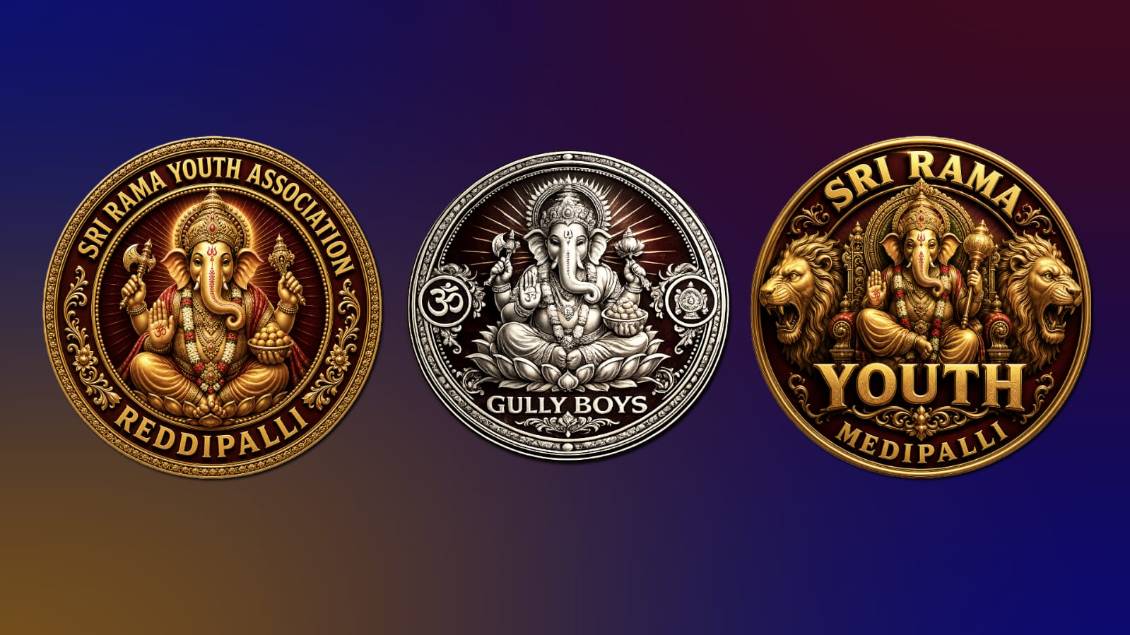
Prompt 1
A circular 3D emblem design featuring Lord Ganesha at the centre, seated on a majestic throne with intricate traditional Indian carvings. Ganesha is adorned with
golden ornaments, a crown, and holding a golden mace. Flanking the centre on the left and right are two fierce, roaring golden lion heads facing outwards with detailed manes. Bold, 3D extruded golden text curves along the top reading "YOUTH NAME", and a large bold golden text reads "BOYS" directly below Ganesha. Smaller golden text curves along the bottom border reading "VILLAGE NAME". The entire design is set against a rich, deep maroon and black background, framed by a thick,
polished circular golden border. Cinematic lighting,
dramatic shadows, highly detailed textures, 8k resolution, royal and powerful aesthetic.
Prompt 2
Create a premium royal circular Lord Ganesha logo with a transparent PNG background. A realistic golden Ganesha seated on a lotus with a traditional crown, rich ornaments, sacred tilak, white-red flower garland, blessing pose (Abhaya Mudra), modaks, axe, lotus, and a glowing golden halo. Use a rich royal maroon background with subtle golden sun rays. Surround it with an ornate metallic gold circular border featuring engraved floral patterns and decorative side ornaments. Add embossed 3D metallic gold serif text around the circle.
Top Text:
"YOUR ASSOCIATION NAME"
Bottom Text:
"YOUR VILLAGE NAME"
Luxury South Indian temple-inspired emblem, ultra detailed, 3D metallic gold, cinematic lighting, symmetrical design, premium branding, 1:1 ratio, 4K, transparent PNG, no watermark, no extra text.
Prompt 3
Create a premium circular Lord Ganesha logo with a transparent PNG background. A realistic golden Lord Ganesha seated on a lotus with a traditional crown, sacred tilak, ornaments, blessing pose, modaks, axe, and lotus. Rich royal maroon background with subtle golden sun rays. Elegant double metallic gold circular border with fine engraved patterns, decorative dots, and sacred Om symbol on the left, temple icon on the right. Embossed 3D metallic gold serif text around the circle.
Top Text:
"YOUR YOUTH NAME"
Bottom Text:
"SINCE 2025"
Style: Minimal luxury, South Indian temple-inspired, ultra detailed, premium 3D gold, cinematic lighting, symmetrical design, clean vector look, 1:1 ratio, 4K, transparent PNG, no watermark, no extra text.
Prompt 4
Create a premium luxury circular Lord Ganesha logo with a transparent PNG background. A unique realistic silver Lord Ganesha seated on a lotus with a traditional crown, detailed ornaments, blessing pose, modaks, axe, lotus, and a radiant silver halo. Elegant double metallic silver circular border with engraved patterns, decorative dots, Om symbol on the left and a temple icon on the right. Use a clean silver, white, and dark grey monochrome theme with polished chrome reflections. Place large stylish embossed 3D metallic silver text at the centre:
"YOUR YOUTH NAME"
Below it, add smaller embossed silver text:
"SINCE 2025"
Style: Modern luxury, South Indian temple-inspired, ultra detailed, premium 3D chrome finish, cinematic lighting, symmetrical composition, clean vector look, 1:1 ratio, 4K, transparent PNG, no watermark, no extra text.