Introduction
Cartoon-style videos continue to attract millions of views across YouTube Shorts, Instagram Reels, and other short-form video platforms. Many creators are now using AI tools to speed up the animation process, generate creative scenes, and improve storytelling. If you want to create videos inspired by the fun, colourful style of Motu & Patlu, Gemini AI can help you brainstorm ideas, write scripts, create scene descriptions, and organise your production workflow. However, it’s important to avoid copying copyrighted characters, episodes, or artwork. Instead, create your own original characters with a similar lighthearted comedy style.
In this guide, you’ll learn how to use Gemini AI to plan, write, and produce engaging cartoon videos while following best practices for originality, quality, and platform guidelines.
Table of Contents
- What Is Gemini AI?
- Can You Create Motu & Patlu Style Videos?
- Things You’ll Need
- Step 1: Generate Video Ideas
- Step 2: Write an Engaging Script
- Step 3: Create Scene Prompts
- Step 4: Generate Cartoon Images or Videos
- Step 5: Add Voiceovers
- Step 6: Edit the Video
- Step 7: Add Music and Sound Effects
- Step 8: Export and Upload
- Comparison Table
- Practical Tips
- Common Mistakes to Avoid
- Conclusion
What Is Gemini AI?
Gemini AI is Google’s AI assistant that can help creators with writing, brainstorming, planning, summarising, and generating creative ideas. Instead of replacing your creativity, it works as a smart assistant throughout the content creation process.
For video creators, Gemini AI can help with:
- Video ideas
- Story writing
- Dialogue creation
- Shot planning
- Prompt writing
- Title suggestions
- Description writing
- Hashtag ideas
Using Gemini AI saves time and helps overcome creative blocks, especially when creating short-form content regularly.
Can You Create Motu & Patlu Style Videos?
Yes—but there is an important distinction.
You should not recreate copyrighted characters like Motu and Patlu or copy scenes, stories, voices, or visual designs from the original series.
Instead, create original comedy characters inspired by the same playful, family-friendly style. This approach respects copyright while allowing you to build your own unique brand.
For example:
Instead of:
- Motu
- Patlu
Create:
- Motoo
- Patloo
- Two completely original cartoon friends with different personalities and appearances
This makes your content safer to publish and more valuable over the long term.
Things You’ll Need
Before starting, prepare the following:
- Gemini AI
- An AI image or video generator
- Voice generation software or your own voice
- A video editor
- Royalty-free background music
- Sound effects
- Thumbnail creation tool
Keeping these tools ready will make your workflow much smoother.
Step 1: Generate Video Ideas
Start by asking Gemini AI for entertaining story ideas.
Example prompt:
“Suggest 20 funny cartoon short video ideas featuring two original best friends in a colorful Indian neighborhood.”
Gemini can generate ideas such as:
- Food challenge
- Funny misunderstanding
- Magic sweets
- Robot helper gone wrong
- Cricket competition
- Treasure hunt
- Festival comedy
- Supermarket adventure
Choose ideas that can be told within 30 to 90 seconds if you’re creating Shorts or Reels.
Step 2: Write an Engaging Script
Once you’ve selected an idea, ask Gemini AI to write a complete script.
A strong script should include:
- A catchy opening
- A simple conflict
- Funny dialogue
- A satisfying ending
- A clear moral or joke
Keep conversations short and energetic so viewers stay engaged until the end.
Step 3: Create Scene Prompts
Next, ask Gemini AI to convert your script into detailed prompts for an AI image or video generator.
A good scene prompt includes:
- Character appearance
- Facial expression
- Background
- Camera angle
- Lighting
- Mood
- Action
The more descriptive the prompt, the better the visual results.
Step 4: Generate Cartoon Images or Videos
Use your preferred AI image or video generation tool to create the visuals.
Generate each scene separately if needed, then combine them during editing.
Maintain consistency by keeping the same:
- Character design
- Clothing
- Colors
- Background style
- Expressions
Consistent visuals help your videos look more professional.
Step 5: Add Voiceovers
Voiceovers make cartoon videos feel alive.
You can:
- Record your own voice
- Use AI voice tools
- Hire a voice artist
Make sure each character has a unique speaking style and personality.
Avoid robotic voices whenever possible, as natural delivery improves viewer engagement.
Step 6: Edit the Video
Import everything into your video editor.
Arrange:
- Scenes
- Voiceovers
- Background music
- Sound effects
- Text
- Captions
- Transitions
Keep cuts quick because short attention spans require fast-paced editing.
Step 7: Add Music and Sound Effects
Good audio dramatically improves cartoon videos.
Useful sound effects include:
- Footsteps
- Door opening
- Funny pops
- Cartoon crashes
- Laughter
- Bells
- Surprise sounds
Use royalty-free music to avoid copyright claims.
Balance music volume so dialogue remains easy to hear.
Step 8: Export and Upload
Export your video in high quality.
Recommended settings:
- 1080 × 1920
- MP4 format
- Vertical layout
- High bitrate
- 30–60 FPS
When uploading:
- Write an attractive title.
- Add a clear description.
- Use relevant hashtags.
- Design an eye-catching thumbnail.
- Publish consistently.
Comparison Table
| Method | Advantages | Limitations |
|---|---|---|
| Gemini AI for planning | Fast idea generation, scripts, prompts, titles | Does not create complete finished videos by itself |
| Manual scripting | Full creative control | More time-consuming |
| AI image/video generators | Speeds up visual creation | May require prompt refinement |
| Traditional animation | Highly customizable | Requires advanced skills and more production time |
Practical Tips
Follow these best practices to improve your results:
- Focus on original characters instead of existing copyrighted ones.
- Start each video with an attention-grabbing scene.
- Keep stories simple and easy to follow.
- Use expressive character emotions.
- Add subtitles for better accessibility.
- Upload consistently to build an audience.
- Review your videos before publishing to catch visual or audio issues.
- Experiment with different story themes to learn what resonates with viewers.
Common Mistakes to Avoid
Many beginners make these mistakes:
- Copying copyrighted characters or stories.
- Writing overly long scripts for short-form videos.
- Using inconsistent character designs.
- Adding too much background music.
- Ignoring captions.
- Uploading low-resolution videos.
- Using copyrighted music or sound effects.
- Publishing without checking for errors.
Avoiding these issues will help your content look more polished and reduce the risk of copyright problems.
Conclusion
Creating entertaining cartoon-style videos with Gemini AI is a practical way to streamline your creative process. Gemini can help you generate ideas, write engaging scripts, develop detailed scene prompts, and organise your workflow. By combining it with AI image or video tools, voiceovers, and thoughtful editing, you can produce original animated content efficiently. The key to long-term success is originality. Rather than recreating Motu & Patlu, use the cheerful comedy style as inspiration while developing your own memorable characters, stories, and visual identity. This approach helps you respect copyright, build a unique brand, and create content that audiences can enjoy with confidence.
______________________________________________________________________________________
Motu & Patlu Image Download
______________________________________________________________________________________
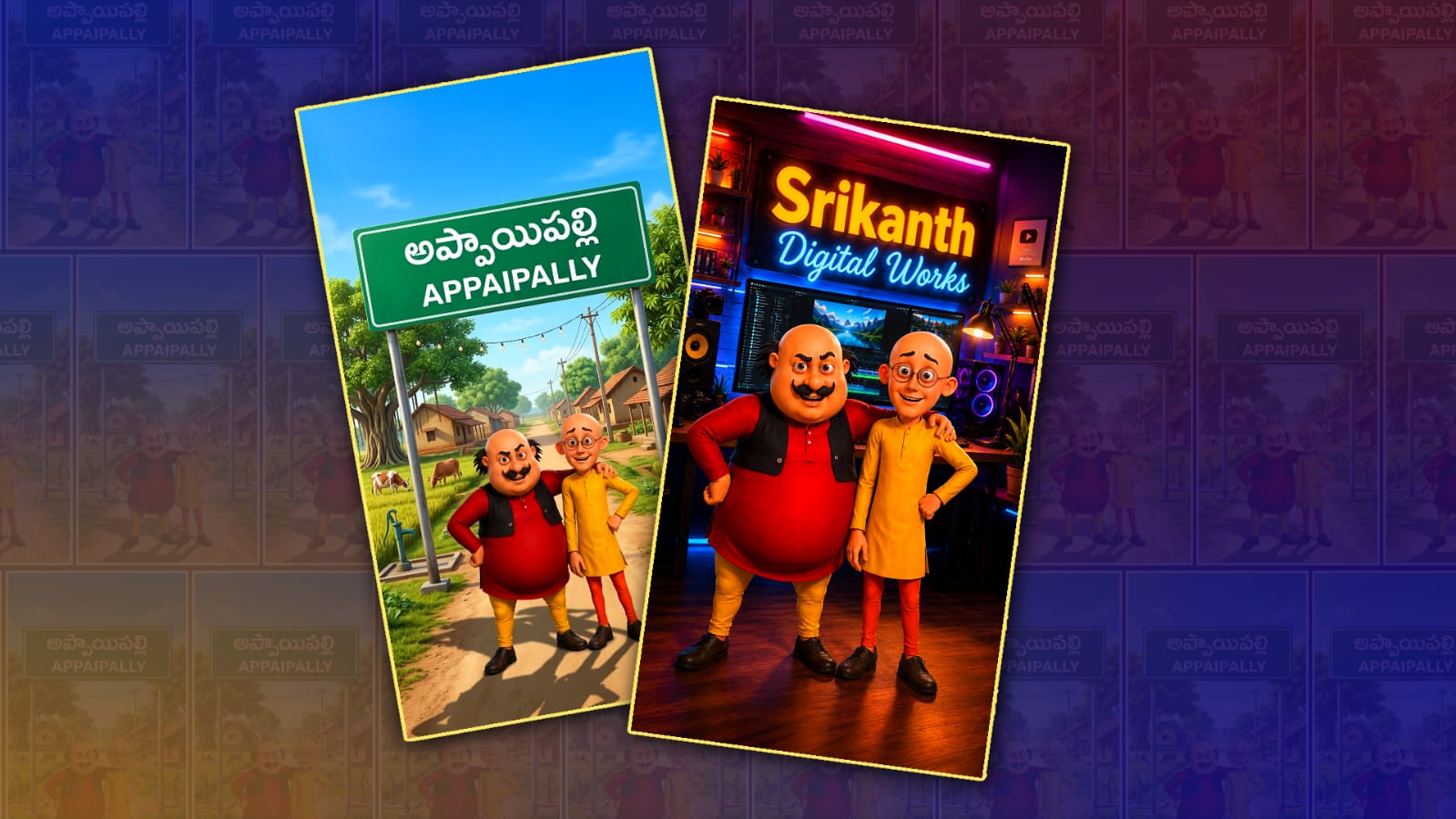
1.Village Name Image Prompt
Use only the people from the uploaded photo. Preserve their facial identity, expressions, pose, hairstyle, skin tone, clothing colors, and body proportions while transforming them into high-quality trending 3D cartoon characters inspired by Motu & Patlu. Remove the original plain background completely.
Create a brand-new realistic Indian village entrance scene based on the village name “[YOUR VILLAGE NAME]”. Add a beautiful green highway-style signboard with a white border displaying “[YOUR VILLAGE NAME IN TELUGU]” on the first line and “[YOUR VILLAGE NAME IN ENGLISH]” on the second line in bold white letters.
Design an authentic village environment with a clean road leading into the village, lush green trees, traditional Indian houses, fields, electric poles, village atmosphere, and bright blue sky. The background should look like the real entrance of an Indian village and match the style of the uploaded people naturally.
Place the cartoon characters standing confidently in front of the village signboard, smiling at the camera. Maintain realistic shadows, perfect perspective, cinematic composition, vibrant colors, Pixar-quality 3D rendering, ultra-detailed textures, realistic lighting, depth of field, highly polished finish, 8K Ultra HD, vertical 9:16 aspect ratio.
Make the final image look like a professionally animated movie poster featuring the uploaded people at the entrance of their own village.______________________________________________________________________________________
2.Background Change Image Prompt
Use the uploaded image as the only reference. Keep the two characters exactly the same without changing anything. Do not modify their faces, expressions, body proportions, clothes, colors, hairstyle, glasses, mustache, pose, lighting on the characters, or animation style. Preserve the exact composition and character placement.
Replace ONLY the background with: [Write Your Background Here]
Blend the characters naturally into the new background with realistic lighting, shadows, reflections, and perspective matching the environment. Make the composite look seamless and professionally edited. Keep the characters sharp and in focus while matching the background color grading and depth of field. Do not add any extra people or objects unless specifically requested.
Output: 9:16 vertical, ultra-realistic, cinematic color grading, HDR 8K quality, highly detailed, professional composite, realistic shadows, soft ambient lighting, depth of field, no text, no watermark.______________________________________________________________________________________
3.Video Prompt
Use the uploaded reference image as the only reference for both characters. Recreate the same two characters exactly as they appear in the uploaded reference image. Do not change or redesign their faces, body proportions, clothing, hairstyle, colors, glasses, mustache, expressions, pose, or overall appearance. Maintain 100% character consistency throughout the video.
Use the exact same background, environment, lighting, colors, objects, perspective, and atmosphere from the uploaded reference image. Do not replace, redesign, or generate a new background. Everything in the background must remain exactly the same as the uploaded image. Animate only the characters while preserving the original scene.
Create a 10-second, 9:16 vertical ultra-realistic Pixar-quality 3D cinematic animated video.
The camera slowly moves forward with smooth cinematic motion. Motu naturally points with his hand while speaking. Patlu smiles, nods, and uses natural hand gestures while talking. Both characters maintain eye contact with the camera and perform realistic body movements, blinking, facial expressions, and perfect natural Telugu lip-sync.
Dialogue
పట్లు: “Telugu Text”
మోటు: “Telugu Text”
Style: Ultra-realistic Pixar-quality 3D animation, cinematic lighting, HDR 4K quality, smooth camera movement, expressive facial animation, realistic Telugu lip-sync, natural body language, no subtitles, no watermark, maintain the exact same background from the uploaded reference image without any changes.