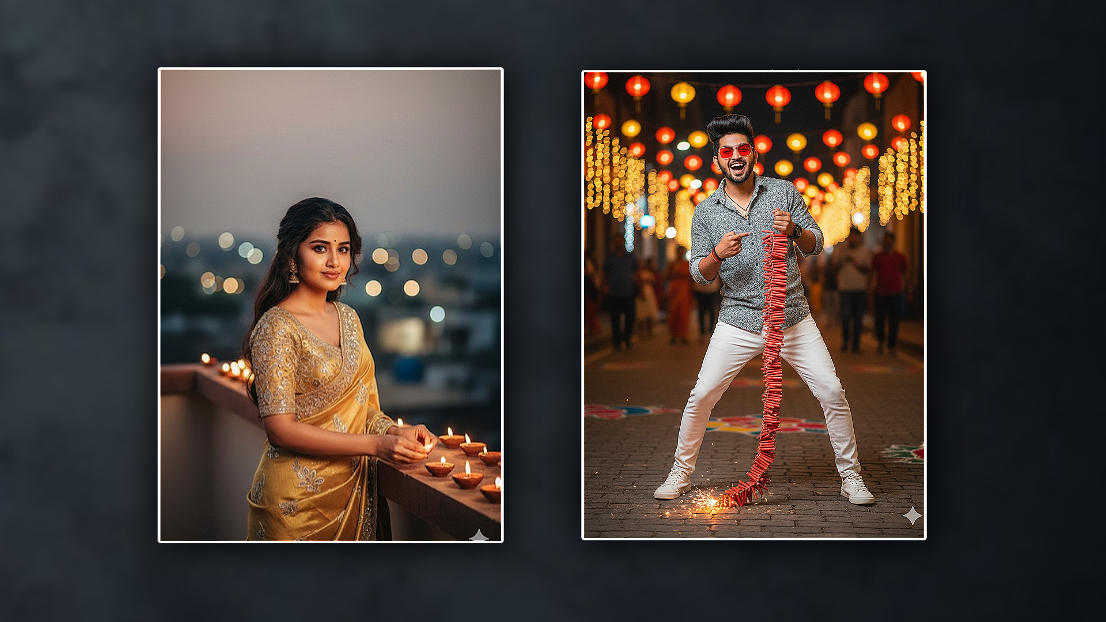
Hello friends welcome to Srikanth Tech Creator website page friends every day we upload all kinds of interesting articles including news technology editing tricks and tips that may be very useful for you try to follow the page daily today in this article also I will simply explain to you how to edit a photo related to a beautiful happy Diwali festival you can edit any person but according to the current technology many people are editing using AI I will explain to you in two ways not with this artificial intelligent I will also explain to you in applications but let’s see what you need to edit this photo. Whatever photo you want to create your personal photo, one or two, since it is the Diwali festival, some images related to it show candles, lamps, like this. If you are in the application itse,lf Photo editing applicati, if you want to edit, if you want artificial tools, what tools do you use?, I will first explain to you how to edit easily in that artificial intelligence; after explaining it in the application, I will also tell you how to edit. First, open any tool. In today’s technology, applications have also come up other than websites. Tools are related to tools. Open any of them and there, first open those tools, upload files or upload a photo, or attach a photo. If there are some options like this, depending on what you select, if you see them, some of them are currently free, some of them require you to sign up, open them. After opening, you have to select your photos there. After selecting the photo, if you want to edit your photo, after selecting your photo, under the photo, you have to give it a text in a language that the artificial intelligence, i.e. AI, understands. It will generate a photo based on the text you give. You should explain the text in a language that you understand. For example, give it like this: After uploading the photo, you should give it below the photo. If you want to give it in Telugu, if not, provide readability. Please create this image in a Diwali festival background with full lights and lamp or candles, and actual property first-rate. He should be searching the camera. He ought to be conserving a thousand or 10,000 crackers in his hand. Otherwise, you need to explain it absolutely. You should give a complete textual content in a language that you recognise. If you want to wear any footwear, you should also mention the colour of these shoes. If you point it out absolutely, it’ll generate it effortlessly within a few seconds after submitting. No matter how many times you supply it with text, it’ll create it and put it in. Then, click on the photograph, and we can have a store option at the top. Click on it, and we are able to store the photos like this. Similarly, I will explain to you using the application. We have many photo editing applications, so I will also explain two applications to you. The first of which is
PicsArt photo editing
 This is a professional application and occupies the first place among the existing photo editing applications. In this, professional photo editing, banners, birthday photos, as well as cards, wedding cards, you can edit everything in it. Visiting cards, business cards, etc. You can edit most of them. However, if you want to edit it, just your own photo is enough. All the other PNG images and other stickers are also in this application. So what do you do first is open this utility, the software might be available within the Play Store, after starting it, a plus signal will seem in the center, click on it, then click on Edit a image, then you will get some options there, the alternatives consist of historical past, colorful backgrounds, texture backgrounds, you’ll also have the photograph you want, every photograph will even have a image approximately it, select a picture of your choice or you may also pick photographs from the gallery. After selecting it, you need to give a little blur effect to that photo. For this blur effect, after clicking on the photo again, click on the blur or FX option at the bottom. There, you will have an option called Blur. Click on it. You can increase or decrease the blur strength you want there.
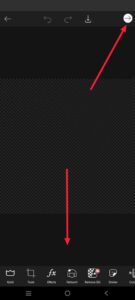 Then pick your photo, and if the background of that image has been removed, maintain it like this. Otherwise, if you want to put it off, after clicking on the photograph, you will have an eraser tool on the pinnacle. Click on it. Then there can be someone option at the bottom. If you click on it, it’s going to robotically put off the beyond. But while the usage of this device on your mobile. This feature will work handiest if it is mandatory. So what do you do? There is a sticky label option at the bottom. Click on it, and there you may see a search alternative, where you’ll see stickers of your preference, and you may upload them. In this way, after you have completely edited the picture, click on the percentage alternative on the proper side at the top, then click on it and click on save to gallery, and the picture can be stored in the rest. You can edit your photo with the utility; however, there is also another software known as.
Pixellab
This is a professional and easy, and free application in which you can edit thumbnails as well as banners and cards. You can do many such editing in professionally. Depending on the tools in this, we can do any kind of photo editing. It is not photo editing, but it is specially designed so that you can do more banners. You can edit the text in 3D and in the tour as we like. It is also simple to edit. There are no expenses for this utility; it’s miles completely loose.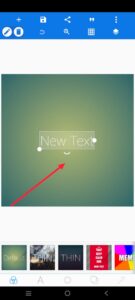 First, open this software. After doing this, the textual content is probably brought straight away to it. After which, click on it, double-click on the textual content or click on the pencil icon at the top, and it will take you to the edit phase, wherein you can write the text you need Or in case you need to edit the image, delete the textual content and then click on a few alternatives at the bottom, among which there’s a length alternative. If you click on on it, if you want to edit a picture or something else, you need to pick out the decision or size related to it. Then come again, and there may be a media alternative on the left side at the top or a gallery option.
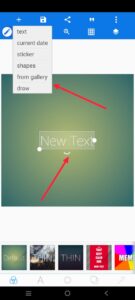 Click on it and add the photo. You also need to colour-read the photo you added. For this, there are many options at the bottom again. Using them, you can also ep hotost, os, and if you want to save it, after the editing is complete, there will be a save icon at the. Click on it.
GEMINI PROMPT
Girl Prompt
“4K cinematic 1/2-frame portrait of a young Indian lady status on a rooftop at some point of the golden-to-blue hour transition. She is facing fully toward the digital camera along with her eyes looking immediately into the lens, sporting a gentle, lovable smile. Use the uploaded reference photograph to exactly in shape her facial features, expressions, and identification, whilst slightly stylizing the relaxation of the photograph for a cinematic impact. She is dressed in a costly golden and silver lehenga, posing elegantly as she lighting fixtures rooftop diyas. Soft, warm cinematic lights highlights her features and flowing hair. The history functions a creamy, gentle bokeh of remote lamps and warm flare lighting fixtures, creating a wealthy, dramatic surroundings. Ensure extremely-sensible textures on her material, skin, and jewellery, with colourful colours and smooth shadows. The composition must be 1/2-frame, targeted on beauty and the festive environment. Strictly keep away from side or profile angles — she must be going through the digital camera immediately.”
Boy Prompt
A stylish young man, face in realistic ( a face reference i uploaded photo ) celebration with diwali in street background, my hand in 10000 wala red Garland crackers in the rode. Grey popcorn shirt, white jean and white shoe, red frame sunglasses. Standing stylish funny pose, Captured in ultra- detailed 8K resolution with sharp textures natural skin tones, realistic shadows please keep original face i uploaded photo