Friends, in this article, I will explain to you some important, useful video editing applications. However, many people do not know how to edit professionally on their mobile phones. We can edit professionally by using applications. If you have learned any editing and still want to edit at the next level, the next step level, as a beginner or professional, you need to use software for that. This software is only used on BC. If we are on mobile, we will tell you how to edit using apps or applications. I will explain to you using some of the best applications. You can start editing them; it will not be easy, but you can edit them simply. I will tell you step by step. Read this article completely, learn and try.
Pics Art Editing
Many people think that this application is only useful for photo editing or editing, but it also has an extra video editing option. I will explain this to you clearly. This is a specially developed application for photo editing. It has effects and all the tools related to photo editing. But it also has an extra option for video editing. Now we have to edit it using it. I will also explain to you, using another application. After playing this application completely, I will explain about another application because it is very easy and good. It has a mobile-friendly user experience and a very simple interface, so that everyone can easily understand it.. I will explain it to you first.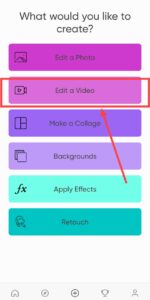 First, open this application. After opening it, you will have some options in it. The first option is editing a photo. The second option is editing a video. You will have six to seven options. In this, you have to click on the second option, editing photo. After clicking, it will take you directly to the gallery. In it, you will have to select which photo or video you want to edit. After selecting the video here, we will have to select one to ten videos or one to ten photos. In it, how many do you want to edit? This filter is used to crop your video and split it. The second option is the Crop option. This is also similar, because we can crop only the area we want. And the third option is the Speed option. So this Speed option is useful when we want to cut the video as much as we want. Then here we have an option called Edit Photo. This is not necessary. This option is useful when we are using any photo on it. Then the Delete option appears. This delete option means that you have added something as an extra layer, and you want to delete it. If you click on it and click on the delete option, it will be deleted. Then duplicate this duplicate. You know, just double the layer you took. Is it okay to duplicate it? Then the volume is to increase or decrease the value of the audio or video players you took. And again, these timelines will show a plus icon on the video you take. So among these, there will be a crop option again. When you click on this crop, you can crop it here again; it will be called Edit Clip. Click on it, and the same option will be there. This adjustment is what we have. Let’s now see how to colour grade photos or videos.
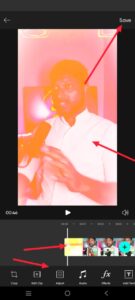 But if there are some more options in this, let’s learn about each option. The first option is Brightness. This brightness is because the video that is the subject of our video is designed to increase the lighting. Then the contrast. This contrast is also the same. Otherwise, we will change all the colours to dark. For example, if you have more lighting, you can reduce it using these contacts. Then the saturation. If the colour of your video or photo is low, you can add more using saturation. Similarly, this option is useful for applying multiple colours to the video we have taken. Then the highlights, highlights are in your video or in your photo or in it. This is useful for increasing lighting in areas where there is more lighting. Then we can add shadows to our videos or photos.
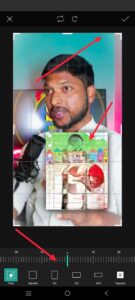 It is useful for making dark areas of photos or videos brighter. Then the HSL option is for us. With this option, we can do colour blending for many people. It has amazing options for making many types of collages. Using this, you can do collages without any software. In this mobile application, you can do collages.
After Effects Uses
This is a computer software in which we mostly do short films in cinema, big event teasers, wedding teasers, etc. It is mostly useful for editing special room feelings. This software is different from all the other software is a good software for making VFX graphics, and you can also do all kinds of video editing. We have this one. This single software can also do multiple tasks. You can edit any kind of editing simply because it has a lot of tools. You can make a normal video into a VFX video that you can’t imagine. It mostly does VFX graphics editing. It has many options, some of which are related to 3D. Using these, we can also add all the subjects and objects we like to a video taken on a normal phone. After editing them like a reality, if we look at them again, we will doubt that this is really real. So we can edit at the next level. How little have we learned about this? It includes motion tracking, stabilising effects, a 3D camera, camera angles, TD text animations, and separate tools for applying glowing effects to text. There are many more in it. We can create apps that we don’t have. This is also available to you at a low cost. So, in a single pack, you will get some of this software. If you buy a pack at once, there will be many software programs. You can also buy them at the same time, that is, for the same year.
Apps Click Here
>Open Google Play Store and Search “Turbo VPN Secure “VPN proxy”