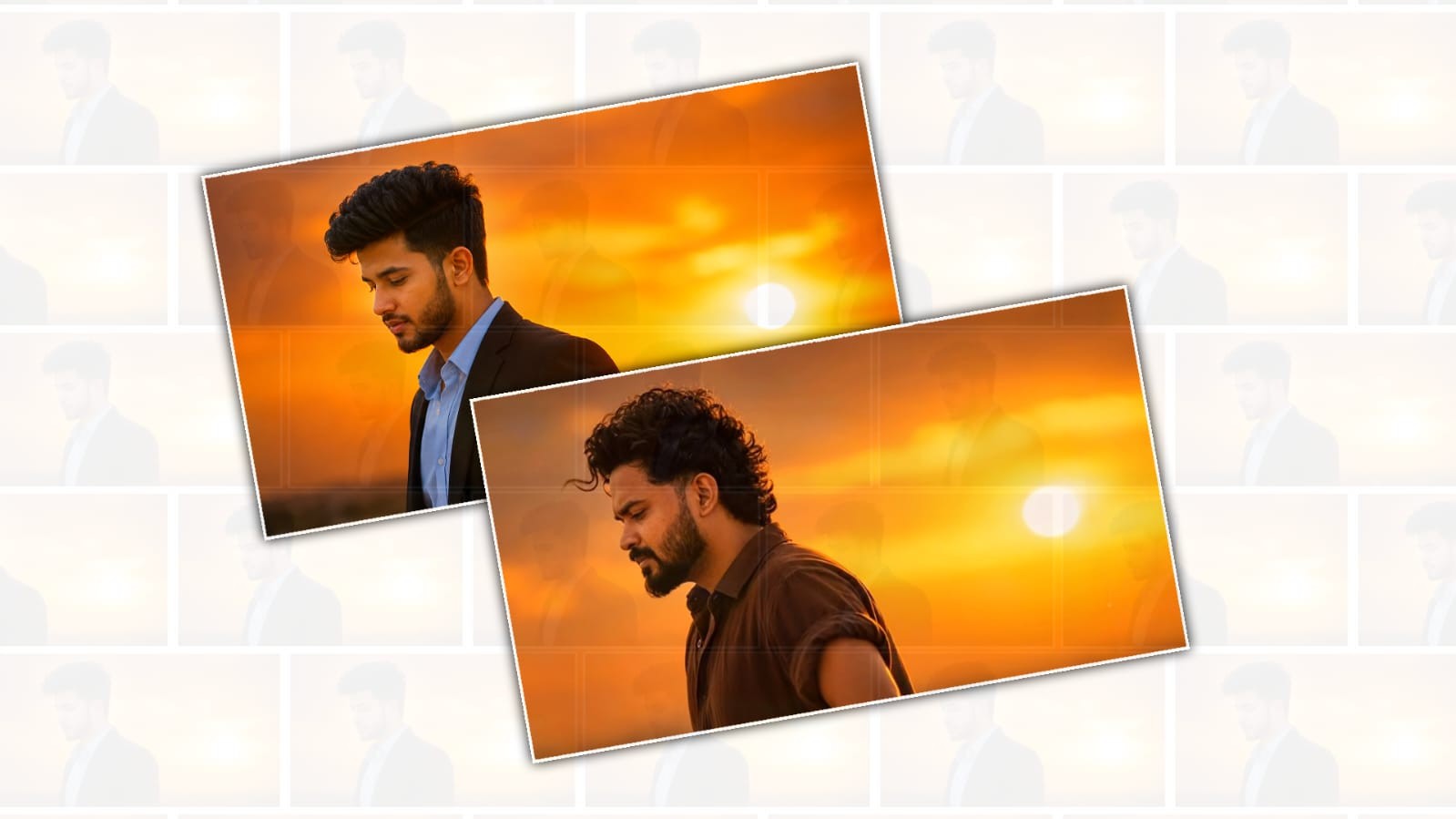
The trending movie sunset scene editing style has become one of the most popular video trends across social media platforms. Many creators are using cinematic sunset backgrounds, dramatic lighting, and emotional colour tones to transform ordinary clips into scenes that look as if they belong in a big-budget film. With the help of Google Gemini, creating this type of video has become much easier because you can use AI to generate ideas, write prompts, create scene descriptions, and improve your editing workflow without needing advanced filmmaking experience.
One of the biggest reasons this editing style has become so popular is its emotional appeal. A sunset naturally creates warm golden colours, soft shadows, and a peaceful atmosphere that instantly attracts viewers. When combined with slow-motion shots, cinematic music, and smooth transitions, the final result looks professional and engaging. Whether you are creating content for Instagram Reels, YouTube Shorts, TikTok, or Facebook, this editing style can help your videos stand out.
The first step is to collect high-quality video clips. You can record your own footage during the golden hour, which is the period shortly before sunset when the sunlight is soft and warm. If you cannot shoot your own videos, you can use copyright-free stock footage from trusted websites. Make sure the clips are recorded in high resolution because better quality footage gives you more flexibility during editing.
Google Gemini can help you plan the entire video before you start editing. Instead of spending time thinking about creative ideas, you can simply ask Gemini to generate a cinematic storyline for a sunset scene. For example, you can ask it to create a romantic, emotional, travel, or action-themed sunset sequence. Gemini can also suggest camera angles, scene order, captions, and dialogue that match the mood of your video.
Another useful feature is prompt creation. If you are using AI image or video generation tools along with Gemini, you can ask Gemini to write detailed prompts describing a realistic movie sunset. A well-written prompt may include golden sunlight, orange clouds, dramatic mountains, cinematic lighting, shallow depth of field, realistic reflections, and ultra-high-definition quality. Better prompts usually produce better AI-generated visuals.
Once your footage is ready, import it into your favourite video editing application. Many creators use CapCut, VN Editor, Adobe Premiere Pro, or DaVinci Resolve. Arrange your clips according to the story you planned with Gemini. Begin with a wide establishing shot of the sunset, then gradually move to close-up shots or slow-motion moments to build emotion. Keeping the video short and engaging is often more effective for social media platforms.
Colour grading plays a major role in achieving the cinematic movie sunset look. Increase the warmth slightly to enhance the golden colours. Adjust highlights carefully so the sky remains detailed instead of becoming overexposed. Lower the shadows a little to create depth while maintaining visibility in darker areas. Boost contrast moderately and add a small amount of saturation to make the colours richer without appearing unrealistic. Many editing apps also offer cinematic LUTs that can instantly improve the overall appearance.
Smooth transitions make the video feel more professional. Instead of using flashy effects between every clip, use subtle fade transitions, motion blur, zoom transitions, or speed ramps. These effects maintain a cinematic flow without distracting viewers. Slow-motion clips work especially well when paired with sunset lighting because they emphasise the peaceful and emotional atmosphere.
Background music is equally important. Choose instrumental, orchestral, piano, or soft cinematic tracks that complement the visuals. Emotional music can significantly increase viewer engagement because it helps people connect with the story. Keep the music balanced so it does not overpower dialogue or ambient sounds if they are included.
Text and captions should also match the cinematic style. Use elegant fonts with simple animations instead of bright or playful text effects. Short captions such as inspirational quotes, travel thoughts, or emotional messages often perform well. Gemini can generate meaningful captions that fit the mood of your video and even create multiple versions so you can choose the best one.
If you want to make your video even more engaging, consider adding visual effects such as lens flares, light leaks, dust particles, or subtle film grain. These effects create a movie-like appearance without making the video feel overedited. Be careful not to add too many effects because simplicity often looks more realistic and professional.
Speed control is another technique used in trending sunset edits. Combining normal speed, slow motion, and speed ramps creates a dynamic viewing experience. For example, you can begin with a fast drone shot of the landscape before slowing down to reveal the sunset behind a person walking toward the horizon. This technique adds storytelling and keeps viewers watching until the end.
Google Gemini can also help with video titles, descriptions, and hashtags. Instead of spending time researching keywords, you can ask Gemini to generate SEO-friendly titles and descriptions for YouTube or catchy captions for Instagram Reels and TikTok. Including relevant keywords naturally improves discoverability and helps your content reach a larger audience.
If your goal is to create a viral sunset video, focus on storytelling rather than effects alone. Even a simple clip becomes memorable when it conveys emotion. Show someone watching the sunset, walking on a beach, standing on a mountain, or driving along a scenic road. Small details such as wind movement, reflections on water, or birds flying across the sky can make the scene feel more cinematic.
Another advantage of using Gemini is script writing. If you plan to include voice-over narration, Gemini can create emotional scripts that match the visuals. A short motivational message or travel reflection often increases audience retention because viewers feel connected to the story behind the video.
Before exporting your project, review the entire video carefully. Check for colour consistency, smooth transitions, balanced audio, and correct timing. Export the video in high resolution, preferably 1080p or 4K if your editing software supports it. High-quality exports appear sharper on social media platforms and create a better viewing experience.
After publishing your video, monitor audience engagement and learn which editing techniques receive the best response. Experiment with different sunset styles, music choices, transitions, and storytelling approaches. Every project gives you valuable experience that helps improve future edits.
Creating a trending movie sunset scene video is no longer limited to professional filmmakers. With creative planning, quality footage, thoughtful editing, and the assistance of Google Gemini, anyone can produce cinematic content that captures attention. By combining AI-generated ideas with your own creativity, you can transform simple sunset clips into visually stunning videos that inspire viewers, increase engagement, and strengthen your presence across social media platforms. Consistent practice, attention to detail, and a willingness to experiment with new techniques will help you develop a unique editing style that keeps audiences returning for more.
BGM Download
Image Prompt
Use the reference image as the exact composition and style reference.
Replace ONLY the face and hairstyle with the exact face, facial structure, skin tone, beard, mustache, hairstyle, hair texture, hairline, ears, and neck from my uploaded photo. Preserve my identity with 100% accuracy. Do not beautify, reshape, smooth skin, de-age, age, or modify any facial feature. No AI-generated face. My uploaded photo must be the only identity reference.
Keep EVERYTHING ELSE exactly the same as the reference image:
- Same side profile pose.
- Same serious downward-looking facial expression.
- Same head angle and body posture.
- Same black rolled-sleeve shirt with identical fabric, folds, collar, sleeve roll, fit, and color.
- Same body proportions.
- Same golden sunset background.
- Same large glowing sun position.
- Same orange sky with identical gradients.
- Same cinematic warm color grading.
- Same lighting, rim light, shadows, and highlights.
- Same camera angle, framing, crop, depth of field, focal length, and perspective.
- Same realistic skin texture.
- Same cinematic mood and atmosphere.
- Same ultra-realistic DSLR photograph quality.
Do NOT change anything except replacing the face and hairstyle with those from my uploaded photo. Every other element must remain exactly as it is in the reference image.
Ultra-realistic, photorealistic, cinematic portrait, HDR, natural lighting, 8K, DSLR quality, razor-sharp details, high dynamic range, professional color grading, masterpiece.
Video Prompt
Use the uploaded image as the first frame and preserve it exactly. Do not change the face, hairstyle, beard, skin tone, clothing, body posture, camera angle, framing, lighting, or background. The animation should begin with the exact same pose shown in the uploaded image. The character remains completely still with a calm, emotional, and thoughtful expression. A gentle evening breeze softly moves only a few strands of his hair in a natural way. His suit collar and shirt move very slightly with the breeze. After about 2 seconds, he slowly and naturally raises his head by just a few degrees while keeping the same left-side profile. His eyes slowly lift forward with the head movement, creating a deep emotional cinematic feeling. There is no body movement, no shoulder movement, no arm movement, and no change in posture. Only the head and eyes move subtly and naturally. The camera performs a very slow cinematic push-in, maintaining the same composition throughout. The glowing golden sunset remains unchanged in the background with soft atmospheric haze, warm rim lighting, shallow depth of field, and creamy bokeh. The entire motion should feel like a realistic South Indian movie close-up, smooth, elegant, emotional, and ultra-photorealistic. Duration 8 seconds, 24fps, 16:9 landscape, 8K quality, HDR cinematic color grading, no text, no logo, no watermark.
Negative Prompt
Do not change the face or identity. Do not rotate the body. No shoulder movement. No arm movement. No walking. No smiling. No talking. No lip movement. No exaggerated head movement. No fast motion. No hairstyle change. No flickering. No camera shake. No extra people. No artifacts. Preserve the exact first-frame composition.